Technical SEO Automation Comparison: What Buyers Should Check
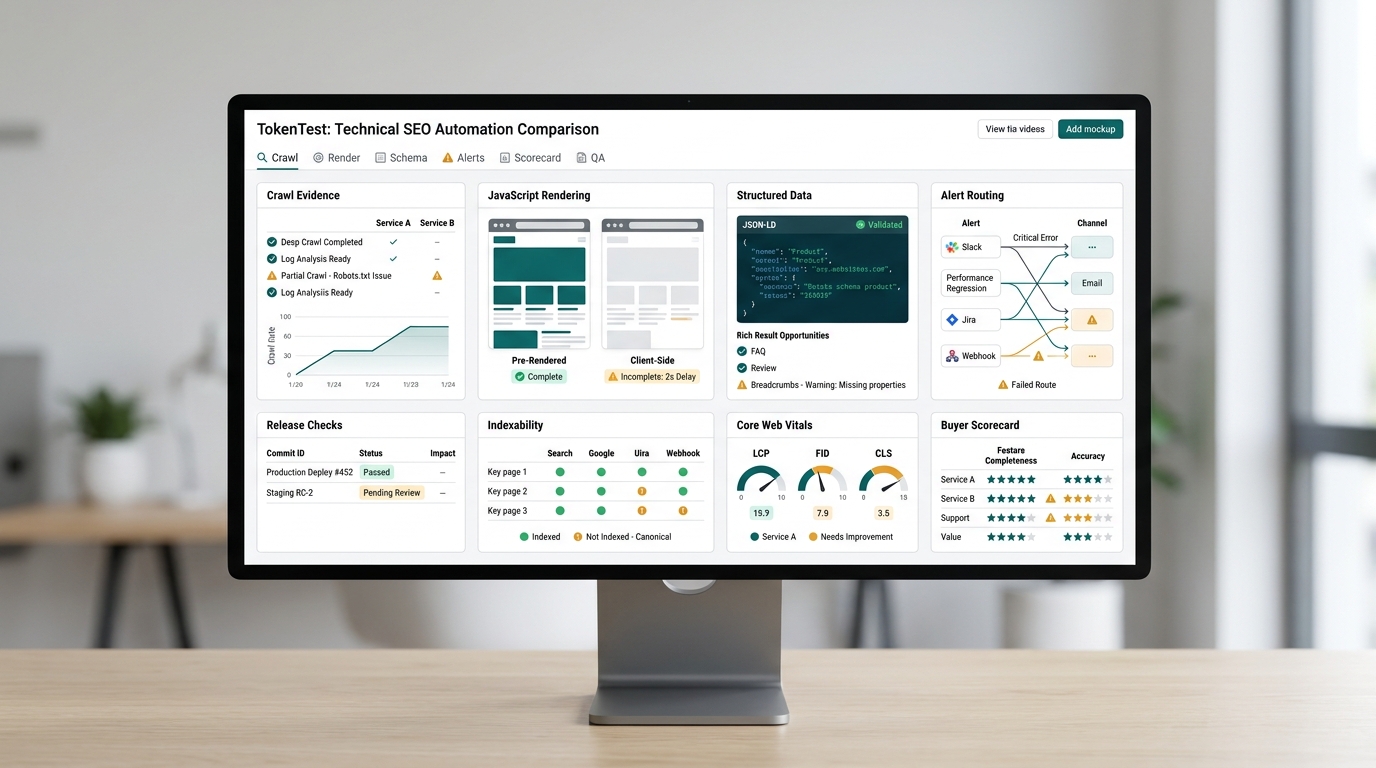
Technical SEO automation sounds simple until a buyer asks one practical question: what exactly will this tool prevent from reaching production?
Most teams do not need another dashboard that lists every possible crawl issue. They need a repeatable way to catch broken canonicals, blocked pages, JavaScript rendering gaps, schema errors, Core Web Vitals regressions, missing hreflang, accidental noindex tags, and internal-link problems before those issues become traffic losses. A useful technical SEO automation comparison should therefore start with evidence, ownership, and release workflow, not with a vendor feature grid.
This guide gives technical SEO leads, growth engineers, and founders a buyer checklist for evaluating technical SEO automation tools. Use it when comparing desktop crawlers, cloud crawlers, real-time monitoring platforms, enterprise SEO suites, and AI-assisted publishing pipelines.
The Short Version
Choose technical SEO automation based on the job you need it to perform.
| Buyer need | Best-fit automation type | What to verify before buying |
|---|---|---|
| Deep audits and migrations | Configurable crawler | JavaScript rendering, crawl comparison, exports, command-line or scheduling support |
| Always-on protection | Continuous monitoring | Alert freshness, change detection, ownership routing, false-positive handling |
| Enterprise site governance | Enterprise crawl and SEO platform | Scale, log-file support, access controls, APIs, issue prioritization, executive reporting |
| Publishing or release QA | CI or CMS workflow automation | Staging checks, canonical and robots validation, schema validation, route readback, rollback evidence |
| AI-assisted content operations | Agentic SEO workflow with verification | Source grounding, duplicate-topic checks, token/cost budgets, human escalation, live route checks |
If the vendor cannot show the before-and-after evidence a team will keep for each automated check, keep looking or budget for custom workflow glue.
Start With the Failure You Need to Prevent
A technical SEO automation tool is only valuable if it protects a business process. Before you compare products, name the failure mode.
For a content-heavy SaaS site, the failure might be publishing a localized article without a canonical, shipping a page that renders empty content to crawlers, or letting AI-generated recommendations change headings without review. For ecommerce, the failure might be faceted URLs exploding crawl volume, product pages losing structured data, or internal links disappearing from high-revenue categories. For a marketplace, it might be a migration where redirects, canonical tags, and indexability signals change at the same time.
The buyer question is not "does this product find technical SEO issues?" The better question is:
When a risky change happens, does the tool detect it early enough, assign it clearly enough, and preserve enough evidence for the team to act?
That framing keeps a technical SEO automation comparison grounded in outcomes.
The 10 Checks Every Buyer Should Run
1. Crawl Coverage and Crawl Control
Every vendor can say it crawls a site. The difference is whether it can crawl the version of the site that matters to your team.
Check whether the tool supports:
- Include and exclude rules for URL patterns, parameters, subdomains, and staging environments.
- Custom user agents, robots handling, authentication, cookies, and crawl-delay controls.
- Sitemap, list-mode, database-export, or API-fed URL discovery.
- Crawl comparison between production and staging.
- Exports that developers can actually use, such as URL, issue, source URL, status code, directive, canonical target, and discovered-in fields.
Screaming Frog, for example, positions SEO Spider as a website crawler for technical SEO audits and lists features such as broken-link discovery, redirect audits, metadata checks, Google Analytics/Search Console/PageSpeed integrations, JavaScript rendering, scheduled audits, and crawl comparison. That makes it a strong fit when the buyer needs hands-on crawl control and repeatable export evidence.
2. JavaScript Rendering Evidence
JavaScript SEO is a buyer trap because "we support rendering" can mean several things. Google Search Central's JavaScript SEO guidance is still the baseline: Google must be able to crawl, render, and index the important content and links. A technical SEO automation tool should make rendering differences visible, not just claim a browser was used.
Ask for evidence that shows:
- Raw HTML versus rendered HTML.
- Links found before and after rendering.
- Indexable text before and after rendering.
- Canonical, robots, hreflang, and structured data after rendering.
- Screenshots or DOM snapshots for failed templates.
- Crawl cost and runtime impact when rendering is enabled.
If the product only gives a generic "JavaScript rendered" badge, it may not be enough for React, Vue, Next.js, or app-router pages where template-level changes can hide content from crawlers.
3. Indexability and Directive Validation
The minimum automated checks should cover HTTP status, canonical URL, meta robots, X-Robots-Tag, robots.txt behavior, sitemap inclusion, nofollow behavior, redirects, and duplicate URLs. But the useful version goes further: it explains which signal is winning and why.
For each important template, the tool should answer:
- Is the public route HTTP 200 without unexpected redirects?
- Is the canonical self-referencing or intentionally consolidated?
- Are robots directives coming from HTML, headers, robots.txt, or a CMS field?
- Is a page in the XML sitemap while also noindexed?
- Did any directive change since the last release?
This is where automation should behave like release QA. A "noindex found" notification is less useful than a dated readback showing the route, response headers, rendered head, expected policy, and owner.
4. Structured Data and SERP Appearance Checks
Structured data errors are easy to automate poorly. Buyers should separate syntax checks from eligibility checks and from business correctness.
Google's structured data documentation is the source of truth for supported rich result types and guidelines. A tool can validate JSON-LD syntax, missing required fields, invalid values, and page-template drift. It cannot guarantee a rich result. Be cautious when vendors overstate that part.
Useful automation should:
- Detect malformed JSON-LD and invalid schema properties.
- Compare structured data across page templates.
- Flag missing required and recommended properties for target rich result types.
- Preserve the rendered structured data extracted from the public page.
- Connect errors to the CMS template, component, or product feed that produced them.
5. Core Web Vitals and Performance Context
Core Web Vitals belong in technical SEO automation, but they should not be mixed into a crawl score without context. Google describes Core Web Vitals as user-centered metrics for loading, interactivity, and visual stability. Buyers should check whether a tool uses lab data, field data, PageSpeed Insights, CrUX, real-user monitoring, or a combination.
Ask:
- Does the report distinguish lab findings from field data?
- Can it group issues by template, device, country, or traffic segment?
- Does it show the affected URLs and the engineering owner?
- Does it preserve before-and-after evidence for release changes?
- Does it avoid treating every Lighthouse suggestion as equal business priority?
A performance automation workflow is useful when it helps the team decide what to fix first, not when it creates a long backlog of generic advice.
6. Scheduled Crawls Versus Continuous Monitoring
Scheduled crawls and continuous monitoring solve different problems.
Scheduled crawls are good for monthly audits, migrations, large batch checks, and comparing snapshots. Continuous monitoring is better for catching high-risk changes soon after they happen: a template deploy, CMS update, redirect rule change, robots.txt edit, or CDN header issue.
In a technical SEO automation comparison, ask vendors to show:
- Alert delay: minutes, hours, daily, or weekly?
- Change scope: one URL, template group, section, domain, or portfolio?
- Alert deduplication: does the same root cause create 500 tickets?
- Ownership: can alerts route to SEO, engineering, content, or localization?
- Evidence retention: can the team see what changed and when?
If you only need a quarterly audit, continuous monitoring may be unnecessary. If organic traffic supports revenue or signups, delayed discovery is often the expensive part.
7. Issue Prioritization and Revenue Context
Many SEO tools find more issues than a team can fix. Automation should reduce triage load, not increase it.
Prioritization should use signals such as:
- Indexable pages affected.
- Organic sessions, clicks, impressions, or revenue tied to the URL group.
- Template or component affected.
- Crawl depth and internal-link importance.
- Change recency.
- Severity of the directive or rendering failure.
- Whether the issue blocks indexing, harms appearance, wastes crawl budget, or affects UX.
Enterprise platforms such as Botify and Lumar position around site visibility, website health, monitoring, audit scale, and broader web-team collaboration. That can be valuable for large sites, but buyers should still ask how the product converts findings into an owner, a priority, and a release decision.
8. Workflow Integration: CMS, GitHub, Jira, and CI
Technical SEO automation is weakest when it lives outside the workflow that creates the problem.
For each tool, ask where the check runs:
- In a crawler after production publish.
- In a CMS preflight before publish.
- In a GitHub Action against preview URLs.
- In a scheduled monitor after deploy.
- In a Jira or Linear queue after triage.
- In an analytics review after Search Console data arrives.
The strongest setup often combines more than one layer: pre-merge checks for obvious blockers, post-publish readback for public route truth, scheduled crawls for drift, and monitoring for high-risk templates.
This is also where TokenTest's own editorial workflow is relevant. TokenTest content operations already emphasize source grounding, route checks, localized readback, and evidence retention. For teams using AI-assisted SEO workflows, the same principle applies: automation should prove what shipped, not just generate what might ship. For a broader workflow map, see Best SEO Automation Workflows and Examples and the Content Publishing QA workflow playbook.
9. AI Recommendation Controls
AI can make technical SEO automation faster, but it can also turn weak evidence into confident suggestions. Buyers should treat AI recommendations as drafting or triage assistance unless the tool also shows the underlying evidence.
Check whether AI-generated recommendations include:
- The exact URL and extracted evidence.
- The rule or source standard behind the recommendation.
- Confidence level and known limitations.
- Human approval gates for destructive changes.
- A change log of what the AI changed or proposed.
- Rollback instructions.
Do not let an AI agent change canonicals, robots directives, redirects, schema, or internal links without a testable diff and a release owner.
10. Pricing, Limits, and Operational Fit
Pricing can change quickly, so verify current vendor pages before procurement. More importantly, map the pricing unit to your actual use case.
Compare:
- Crawl credits, URLs, projects, users, seats, domains, and rendered pages.
- Overages for JavaScript rendering, scheduled crawls, exports, API access, and log-file ingestion.
- Whether staging or preview environments count against limits.
- Data retention windows.
- SSO, role-based access control, audit logs, and procurement requirements.
- Support level and migration assistance.
A desktop crawler with automation may be better than an enterprise suite for an agency audit workflow. A continuous monitoring platform may be better than a manual crawler for a fast-moving CMS. An enterprise crawler may be required when millions of URLs, logs, permissions, and executive reporting matter.
A Practical Scorecard for Technical SEO Automation Tools
Use a 0-2 score for each row: 0 means missing, 1 means present but weak, 2 means strong enough for your workflow.
| Check | What "strong" looks like | Score |
|---|---|---|
| Crawl control | URL rules, auth, sitemaps, staging, exports, repeatable configs | 0-2 |
| JavaScript rendering | Raw/rendered diff, DOM evidence, rendered directives and links | 0-2 |
| Indexability | Status, canonical, robots, sitemap, redirects, header checks | 0-2 |
| Structured data | Rendered JSON-LD extraction, validation, template grouping | 0-2 |
| Core Web Vitals | Field/lab distinction, template grouping, owner-ready evidence | 0-2 |
| Monitoring | Fresh alerts, deduplication, change history, owner routing | 0-2 |
| Prioritization | Business impact, template scope, recency, severity | 0-2 |
| Workflow fit | CMS, GitHub, Jira, API, scheduled jobs, release evidence | 0-2 |
| AI controls | Sources, confidence, diff, approval, rollback | 0-2 |
| Governance | Roles, audit logs, SSO, retention, permissions | 0-2 |
Interpret the total:
- 0-8: Useful for ad hoc audits, not enough for automated protection.
- 9-14: Good for a specific workflow if gaps are covered manually.
- 15-18: Strong operational fit for most technical SEO teams.
- 19-20: Strong fit for high-risk or high-scale environments, assuming pricing and support work.
Comparison Questions to Ask Vendors
Use these questions in demos and RFPs.
- Can you show the exact evidence retained when a canonical, noindex, or redirect changes?
- Can we run the same checks against staging, preview URLs, and production?
- What happens when JavaScript rendering changes the links or content found?
- Can alerts route to the owner of the template, not just the SEO team?
- How do you prevent duplicate tickets when one template breaks 10,000 URLs?
- Which APIs are available for exports, CI, dashboards, or data warehouses?
- Can we set blocker versus advisory rules?
- How do AI recommendations cite the evidence behind a proposed fix?
- What limits apply to rendered pages, scheduled crawls, projects, and data retention?
- Can we read back a public URL after publish and store the route, headers, canonical, H1, schema, and robots state?
The last question is often the most revealing. If a platform cannot preserve public readback evidence, it may be an audit tool rather than a release-control tool. TokenTest's blog publishing automation checklist gives a related go/no-go model for publishing operations.
Where TokenTest Fits
TokenTest is not trying to replace technical SEO crawlers. Its current public product is a production-reference evaluation console for AI middle-layer buyers: it batch-tests model capability, route protocol, token usage, safety boundaries, and channel reliability without storing the user's API key. The broader TokenTest content strategy is about proof-led automation: source grounding, route validation, token budgets, and release evidence.
For technical SEO automation, that perspective matters when AI agents or LLM workflows are part of the publishing system. If an agent drafts, translates, validates, or publishes SEO content, buyers should test the agent workflow itself:
- Does it preserve sources?
- Does it avoid unsupported product and pricing claims?
- Does it stay inside token and cost budgets?
- Does it validate the source route and localized routes?
- Does it record enough evidence for a reviewer to reproduce the run?
That is not a replacement for Screaming Frog, Sitebulb, Lumar, Botify, Ahrefs, Semrush, or continuous monitoring tools. It is a release discipline: automated SEO work should be testable before and after publication.
Final Buyer Recommendation
The right technical SEO automation stack depends on your risk profile.
If you run audits for many small sites, prioritize crawl control, exports, and repeatable scheduled jobs. If you own a fast-changing product or content site, prioritize continuous monitoring, public route readback, and owner routing. If you manage a large ecommerce or marketplace site, prioritize scale, logs, API access, template grouping, governance, and revenue-aware prioritization. If AI is part of your SEO workflow, add verification gates for source grounding, token budgets, route checks, and human approval.
A strong technical SEO automation comparison should end with one clear answer: which tool will catch the next expensive SEO regression early enough for your team to fix it?
That is the standard buyers should use.