What to Do When an LLM Says Your Message Exceeds the Maximum Context Length
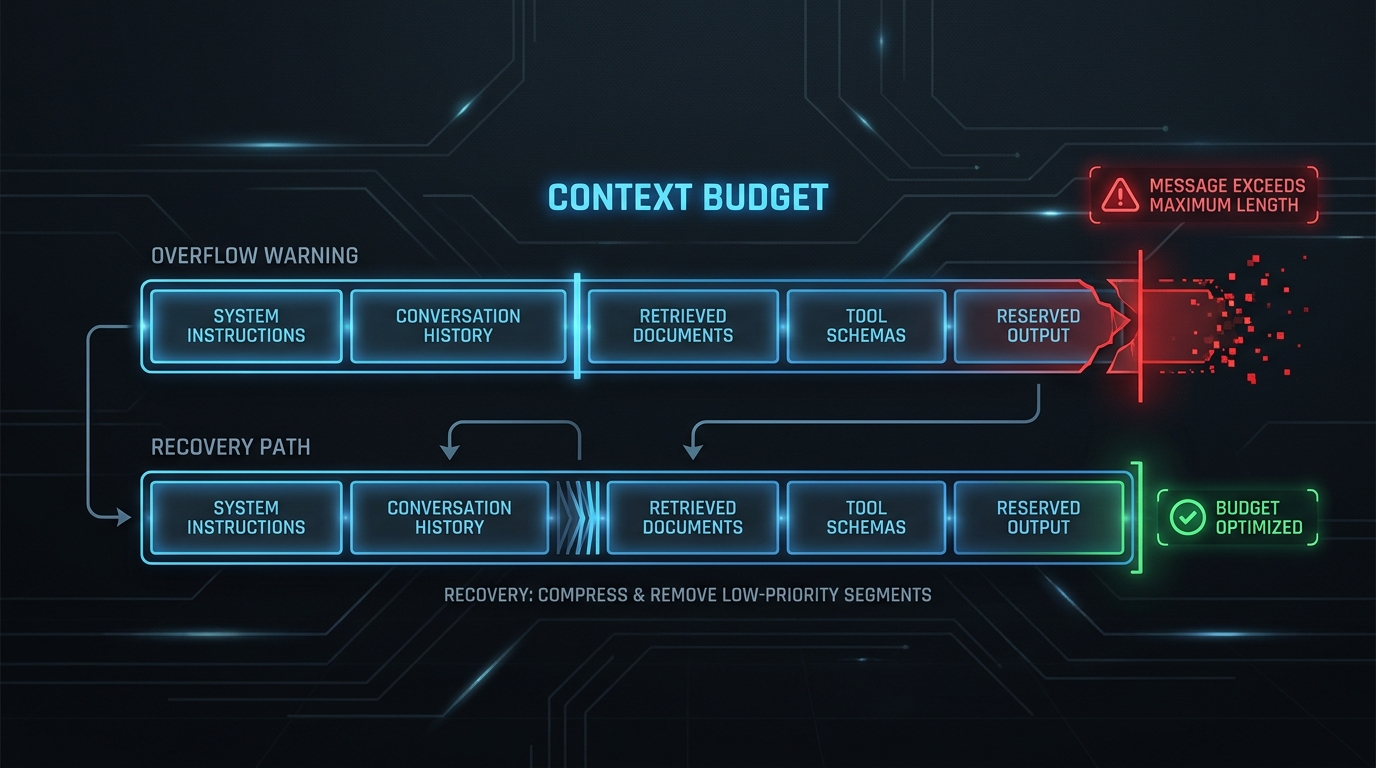
Your request is not necessarily “too wordy” when an LLM says your message exceeds the maximum context length. The request may also contain hidden instructions, conversation history, retrieved documents, tool schemas, images, or reserved output that all compete for the same context window.
The fastest safe response is not to delete random paragraphs. First identify what consumed the budget, protect the output space the task needs, and then remove or compress the lowest-value input.
This guide gives you a recovery sequence you can use immediately, a budget formula for preventing the error, and a synthetic response fixture you can paste into the TokenTest production-reference evaluation console to inspect token-usage evidence without entering an API key.
What “message exceeds the maximum context length” means
A model can process only a limited amount of context in one request. Depending on the provider and API, that budget may include:
- system and developer instructions;
- the current user message;
- previous conversation turns;
- retrieved documents or file contents;
- tool definitions and JSON schemas;
- image, audio, or document representations;
- the model’s visible output;
- provider- or model-specific internal tokens.
The practical rule is:
request input + reserved output + serialized overhead + safety margin
<= model context window
If the total does not fit, the provider may reject the request before generation. Some systems instead trim older material, compact context, or return a shorter response, so the exact behavior is provider- and endpoint-specific. Check the documentation for the model and route you actually call rather than relying on a remembered model limit.
Do this first: a 60-second recovery sequence
When a message exceeds the maximum context length, use this order:
- Save the exact failed request and error. Keep the model ID, endpoint, input, tool schemas, output cap, and raw error response.
- Count the complete request shape. Use the provider’s native token-counting method when available. Counting only the visible user prompt can miss messages, tools, files, and serialization overhead.
- Protect an output reserve. Decide how much space a valid answer needs before spending the rest on input.
- Remove accidental duplication. Repeated policies, duplicated chat turns, copied navigation, and repeated retrieval chunks are usually the safest first cuts.
- Reduce low-value context. Keep the instructions and evidence that affect the answer; remove background that does not.
- Retry with the same model and settings. Change one budget variable at a time so you can identify what fixed the request.
- Inspect the returned usage and finish reason. A request that no longer errors can still fail if the answer is truncated or token accounting is inconsistent.
If you are using a chat interface rather than an API, the equivalent quick fix is to start a new conversation with a compact handoff summary, the current objective, required constraints, and only the source material needed for the next step.
Calculate a safe maximum context length input budget
Do not treat the advertised context window as a target for your visible prompt. Calculate the usable input budget instead:
usable input budget
= context window
- required output reserve
- tool and request overhead
- uncertainty margin
For example, suppose your chosen route supports a context window of W tokens. Your task requires an output reserve of R, your measured tool/schema overhead is T, and your safety margin is S.
maximum planned input = W - R - T - S
Use symbols until you have verified the current model limit from official documentation. Model names, aliases, route behavior, and limits can change. A hard-coded table in a prompt library can become wrong even when the code around it still works.
What belongs in the output reserve?
Reserve enough capacity for a valid completion, not merely for any completion. Include space for:
- the requested answer length;
- mandatory JSON keys or XML tags;
- citations, code blocks, or tables;
- variance between easy and difficult inputs;
- provider-specific reasoning or structural usage when applicable;
- a small retry or repair margin for strict outputs.
Reducing the output cap may make the request fit, but it can trade a context-length error for an incomplete answer. If the model stops because it reaches a length limit, increase the reserve or reduce input further.
Trim maximum context length usage in the right order
The best trimming sequence preserves behavior while removing waste.
1. Delete duplicate material
Look for repeated system rules, repeated examples, duplicated retrieval passages, quoted email chains, boilerplate headers, and conversation turns already summarized elsewhere.
2. Remove irrelevant retrieval chunks
Retrieval-augmented generation often fails because too many “possibly relevant” chunks are included. Improve filtering, deduplicate near-identical passages, cap chunks per source, and prefer the smallest evidence set that can answer the question.
3. Summarize old conversation history
Replace older turns with a structured state record:
Objective:
Decisions already made:
Constraints that must remain:
Open questions:
Required source facts:
Keep recent turns verbatim only when their wording matters.
4. Shorten examples before core instructions
Few-shot examples can be valuable, but long examples are expensive. Remove redundant examples, shorten their input, and retain the cases that establish distinct behavior. Do not delete safety, format, or business rules merely because they appear near the top of the prompt.
5. Reduce tool schemas
Large tool descriptions, repeated enums, deeply nested schemas, and tools irrelevant to the current step can consume significant input. Expose only the tools available for this turn and simplify descriptions without changing validation requirements.
6. Split the task
If the evidence is genuinely too large, use staged processing:
- extract facts from each section;
- merge and deduplicate the facts;
- produce the final answer from the compact evidence set.
This is safer than asking one request to read every source and write the final answer simultaneously.
Paste-ready tests
Test 1: create a compact handoff
Paste this into your LLM after replacing the bracketed fields:
Create a compact handoff for a new conversation.

Preserve only:
1. the current objective;
2. decisions already made;
3. constraints that must not change;
4. unresolved questions;
5. source facts needed for the next action.

Remove greetings, repeated explanations, abandoned options, and completed implementation detail.
Return fewer than [TARGET] words in these headings:
Objective, Decisions, Constraints, Open Questions, Required Facts.

Conversation:
[PASTE CONVERSATION]
Count the result with the provider’s native tool, then use it to start a fresh conversation.
Test 2: compress retrieved evidence
Reduce the evidence below without changing supported facts.

Keep:
- facts that directly answer [QUESTION];
- dates, quantities, identifiers, and exceptions;
- source labels needed for attribution;
- disagreements between sources.

Remove:
- navigation and boilerplate;
- duplicate claims;
- examples that do not affect the answer;
- prose that can be replaced by a shorter equivalent.

Return:
1. Essential facts
2. Conflicts or uncertainty
3. Facts safe to omit

Evidence:
[PASTE EVIDENCE]
Test 3: inspect a length-stop response in TokenTest
TokenTest currently provides an offline raw-response analyzer on its homepage. Paste a real response from your own endpoint, or use this synthetic diagnostic fixture to see the expected structure:
{
  "id": "synthetic-context-test",
  "model": "replace-with-your-model-id",
  "choices": [
    {
      "message": {
        "role": "assistant",
        "content": "The response stopped before completing the requested structure."
      },
      "finish_reason": "length"
    }
  ],
  "usage": {
    "prompt_tokens": 7800,
    "completion_tokens": 200,
    "total_tokens": 8000
  }
}
The numbers are illustrative, not a benchmark. Replace them with your endpoint’s actual response. TokenTest’s product manual says its D4 checks cover usage presence, total consistency, input monotonicity, output reasonableness, truncation linkage, and cache-token evidence. That makes it useful for verifying whether a compatible route reports the evidence you need after you fix a maximum context length error.
Prevent maximum context length errors in production
Count the assembled request, not the template
Token counts should be measured after variables, chat history, retrieval results, tools, and attachments have been assembled. A short template can produce a large request once production data is inserted and consume the maximum context length unexpectedly.
Set budgets for every component
Define explicit limits for system instructions, history, retrieval, tools, user input, and output. Reject, summarize, or route the request before it crosses the planned budget.
Keep a safety margin
Do not operate at the exact published limit. Leave room for tokenization differences, serialization changes, provider wrappers, and future prompt edits. The margin should be measured and adjusted from real requests rather than copied universally from another application.
Test languages separately
Equivalent English and Chinese prompts do not necessarily produce equal token counts. Tokenization depends on the exact model and tokenizer, so multilingual applications should count representative requests in every supported language instead of multiplying an English estimate by a fixed ratio.
Log the evidence required to diagnose failures
For each request, record at least:
- provider, route, and returned model ID;
- input, output, cached, and total token usage when supplied;
- requested output limit;
- finish or stop reason;
- history and retrieval sizes;
- tool count and schema size;
- language and request type;
- whether the response passed structural validation.
Then test the exact production route. TokenTest can batch-evaluate compatible model endpoints and inspect usage integrity, truncation linkage, cache evidence, and other production-readiness signals. Its manual also recommends using a dedicated test key rather than a production master key.
Common fixes that backfire
| Quick fix | Why it can fail | Safer alternative |
|---|---|---|
| Delete the system prompt | Removes behavior, policy, or format requirements | Preserve invariants; shorten wording and examples |
| Set output tokens near zero | Makes the request fit but truncates the answer | Define a minimum valid output reserve first |
| Drop the oldest messages blindly | Removes decisions the current turn depends on | Summarize history into structured state |
| Keep every retrieved chunk | Adds duplicate and weakly relevant evidence | Rerank, deduplicate, and cap evidence |
| Trust one tokenizer for every model | Produces inaccurate planning across providers | Use provider-native counting for the actual route |
| Retry unchanged | Repeats cost and latency without learning | Change one budget variable and compare telemetry |
Maximum context length checklist
Before retrying, confirm:
- [ ] The exact model and endpoint are known.
- [ ] The full request shape was counted.
- [ ] Output capacity is reserved before input.
- [ ] Duplicate instructions and retrieval chunks are removed.
- [ ] Old history is summarized rather than blindly deleted.
- [ ] Irrelevant tools are excluded.
- [ ] A safety margin remains below the verified limit.
- [ ] The retry logs usage and finish reason.
- [ ] English, Chinese, and other supported languages are tested separately.
- [ ] The production-compatible route reports plausible token evidence.
FAQ
Can I fix the error by starting a new chat?
Often, yes. A new chat removes accumulated history. Carry forward a compact handoff containing the objective, decisions, constraints, open questions, and required facts so you do not lose important state.
Why does the error happen when my visible message is short?
The visible message may be only one component. System instructions, previous turns, retrieval, tools, files, images, and reserved output can also consume context.
Should I lower the maximum output tokens?
Only after defining the minimum capacity required for a valid answer. Otherwise you may replace the request error with a truncated or invalid response.
Is character count close enough to token count?
No. The relationship varies by language, text structure, tokenizer, and model. Use a tokenizer or count endpoint appropriate to the route you will call.
Does a larger-context model solve the problem permanently?
It can provide headroom, but it does not fix duplicated retrieval, unbounded chat history, oversized tools, or missing budgets. Larger windows can postpone the same architectural problem while increasing latency or cost exposure.
The durable fix is a budget, not a bigger prompt
When an LLM says your message exceeds the maximum context length, recover by measuring the complete request, protecting output capacity, and trimming context according to value. Then make the fix durable with component budgets, multilingual tests, telemetry, and production-route verification.
Use the context-window planning guide for architecture-level budgeting, review why your prompt is too long for request-counting mistakes, and protect answer quality with the guide to reserving output tokens.