Why Your Prompt Is Too Long: Common Token Counting Mistakes
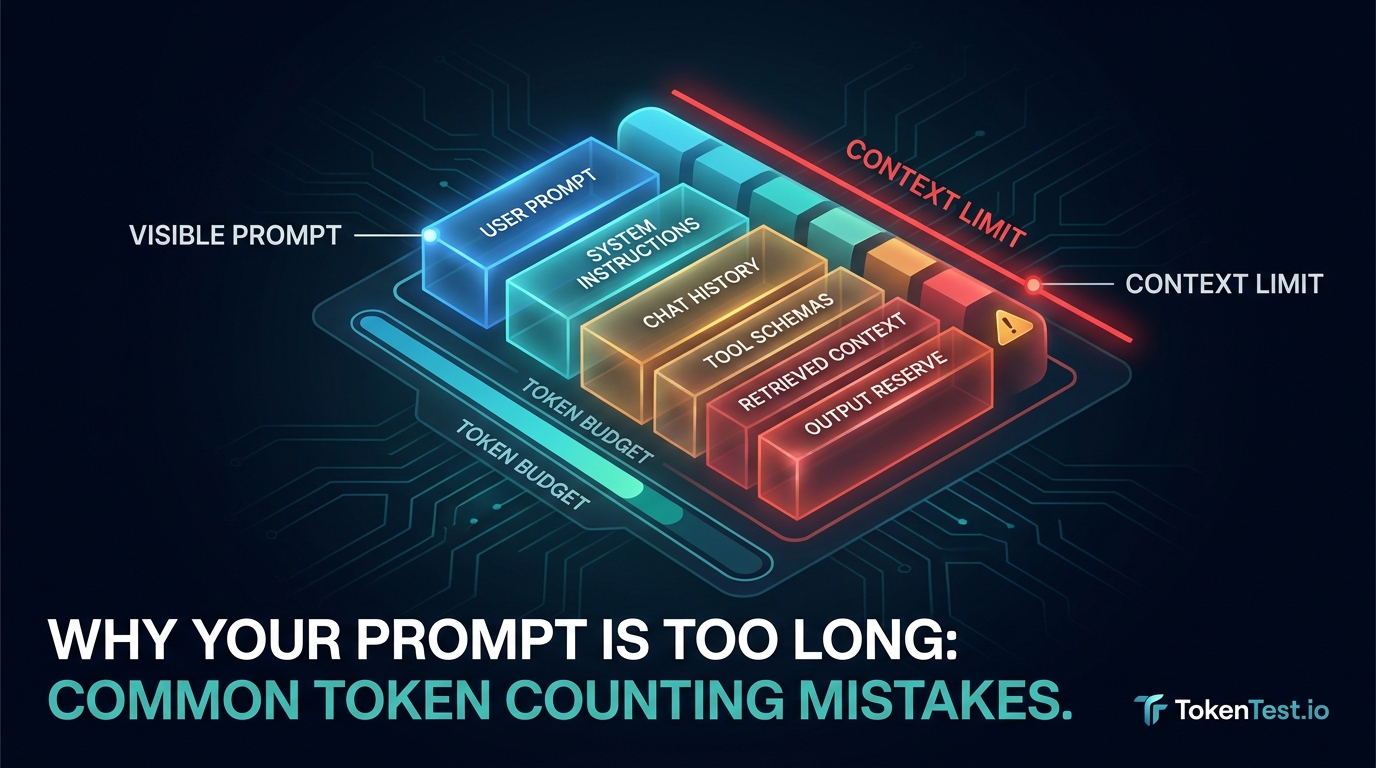
A prompt can look short in an editor and still fail with a context-length error. The usual reason is not that the model “miscounted.” It is that the number you counted was not the complete request the model received.
Developers often count the visible user message, estimate from words or characters, and compare that number with a model’s context window. But the actual input may also include system or developer instructions, conversation history, retrieved documents, tool definitions, JSON schemas, attachments, and model-specific formatting. You also need room for the answer.
The safer rule is:
Count the exact serialized request, reserve output capacity, then verify the live endpoint’s reported usage.
This guide explains the most common token-counting mistakes and gives you practical tests you can run against your endpoint with TokenTest.
What “prompt too long” usually means
In practice, “prompt too long” can describe several different failures:
- The complete input exceeds the model or endpoint’s accepted context.
- The input fits, but the requested output leaves the combined request without enough room.
- A framework silently adds history, retrieved context, tools, or schemas after you count.
- A router resolves your request to a different model or tokenizer than expected.
- Your local estimate and the provider’s server-side accounting measure different things.
- The request technically fits but is truncated, rejected, or billed differently by an intermediary.
Treat the error as a request-construction problem first. Before shortening useful instructions, determine which layers are consuming the budget.
Mistake 1: treating tokens as words or characters
Tokens are pieces of text produced by a tokenizer. They are not reliably equal to words, characters, bytes, or lines.
Punctuation, spaces, capitalization, long identifiers, numbers, emoji, accented text, Chinese text, and code can split differently. Even similar-looking strings may produce different token counts.
For example, these inputs have comparable visual length but very different structure:
Reset the user password after identity verification.
{"action":"reset_password","requires_identity_verification":true}
验证身份后重置用户密码。
A fixed “four characters per token” or “one token per word” rule may be acceptable for a rough early estimate on a known English corpus. It is not safe for enforcing a production limit.
Better approach: use the tokenizer associated with the target model when available. For structured API requests, use an exact provider-side counting method when the provider offers one.
Mistake 2: using the wrong model or tokenizer
Token count depends on the tokenizer. Counting with a convenient tokenizer and sending to a different model can create a false sense of precision.
This problem appears when:
- you change model families but keep the old counting code;
- a gateway aliases several upstream models behind one name;
- a router changes the resolved model without changing your application configuration;
- a local library does not yet recognize a newer model and falls back to a default encoding;
- you compare two providers using a single tokenizer.
The OpenAI token-counting guide explicitly maps models to encodings and recommends using the model-aware encoding lookup. Its newer API guide also separates local string tokenization from exact counting of structured API inputs.
Better approach: record both requested_model and resolved_model with every measurement. Pin the tokenizer version in tests. If the resolved model changes, invalidate the old baseline.
Mistake 3: counting only the visible user prompt
The text in your prompt editor is often only one layer of the request.
A realistic application may send:
system or developer instructions
+ conversation history
+ current user message
+ retrieved documents
+ file or image inputs
+ tool definitions
+ JSON schemas
+ response-format instructions
+ provider-specific message formatting
= actual input presented to the model
If your interface shows a 2,000-token user message but your framework attaches 8,000 tokens of history and retrieval, the operational input is not 2,000 tokens.
This is especially common in chatbots. Each turn may replay earlier messages. A conversation that worked ten turns ago can cross the limit even when the newest user message is short.
Better approach: build a component-level ledger:
| Request component | Included in count? | Reduction rule |
|---|---|---|
| System/developer instructions | Yes | Deduplicate repeated policies |
| Conversation history | Yes | Summarize or window old turns |
| Current user message | Yes | Preserve the actual task |
| Retrieved context | Yes | Rank, filter, and cap chunks |
| Tools and schemas | Yes | Load only relevant definitions |
| Attachments | Yes | Use the provider’s counting method |
| Output reserve | Yes | Protect room for a valid answer |
Do not label a user-message count as the total prompt count.
Mistake 4: forgetting tools, schemas, and framework wrappers
Tool calling can add a surprising amount of input. Function names are usually cheap; verbose descriptions, repeated examples, nested schemas, enums, and response-format definitions are not.
Frameworks may also transform a compact configuration into a much larger wire payload. A tool can be described in application code once but serialized into every request.
Consider a support agent with 30 tools. If the current question only needs order lookup and refund eligibility, sending all 30 definitions wastes context and can make tool selection harder.
Better approach: capture the final request payload immediately before the API call. Count or measure that version, not an earlier prompt template. Dynamically load only the tools relevant to the current route, and keep descriptions precise.
Mistake 5: using the entire context window for input
A model’s context capacity is not automatically an input allowance. The request also needs room for output, and some systems may account for additional generated or reasoning tokens within the overall budget.
If an application fills almost the entire available context with input and then asks for a long answer, one of three things happens:
- The request is rejected before generation.
- The answer stops early at a token limit.
- The system trims input or output in a way that breaks the task.
Better approach: define a budget before assembling context:
safe input budget
= supported context capacity
- required output reserve
- operational safety margin
Choose the output reserve from the task, not from leftover space. A classification response may need very little. A code patch, structured report, or multi-step analysis may need much more.
Mistake 6: counting a draft instead of the production request
Small transformations add up:
- a template expands variables;
- Markdown becomes escaped JSON;
- logs receive timestamps and metadata;
- retrieval adds titles, URLs, separators, and citations;
- chat history is duplicated by a state bug;
- a response schema is appended after the count;
- an SDK or provider inserts control markers.
Counting before those transformations answers the wrong question.
Better approach: count at the latest possible point in the request pipeline. Store a hash of the counted payload beside the measurement. If the hash changes before transmission, the count is stale.
Mistake 7: assuming all pasted content has similar token density
Developers often trim the wrong material because they compare files by characters or lines.
Token-heavy content can include:
- minified JavaScript or CSS;
- generated code and lockfiles;
- long stack traces with repeated paths;
- JSON with repeated keys;
- UUIDs, hashes, timestamps, and encoded data;
- multilingual text;
- tables with repeated separators;
- logs that repeat the same event hundreds of times.
By contrast, a longer plain-English explanation may be cheaper than a shorter block of noisy machine data.
Better approach: measure components separately. Remove low-value, high-token material first: duplicate logs, irrelevant frames, minified assets, generated files, stale retrieved chunks, and unrelated tool schemas.
Mistake 8: treating a local count as final usage
Local tokenization is useful, but it is not always the final operational number.
The live endpoint may account for structured messages, cached input, images, files, tools, schemas, or provider-specific formatting. An OpenAI-compatible gateway may also report incomplete or internally inconsistent usage fields.
Keep these measurements separate:
| Measurement | What it tells you |
|---|---|
artifact_tokens_local |
Size of the pasted document, code, or log |
request_tokens_local |
Local estimate for the assembled request |
input_tokens_reported |
Input usage reported by the live endpoint |
cached_input_tokens |
Reused input reported separately, when supported |
output_tokens_reported |
Generated output usage |
total_tokens_reported |
Provider-reported total, if present |
Do not force a missing field to zero. Store missing values as null, because “not reported” and “reported as zero” are different facts.
A practical TokenTest workflow for debugging long prompts
TokenTest is not a replacement for a model-specific tokenizer. It validates the live endpoint around the tokenizer: model identity, usage integrity, input-token behavior, output limits, cache evidence, and protocol consistency.
The TokenTest product manual describes checks for input-token monotonicity, total-token consistency, output reasonableness, stop/token-limit linkage, streaming usage, and cache-token behavior. Use those checks after assembling your real request.
Test 1: short prompt versus expanded prompt
Send two requests with the same task and model:
Version A: current user task only
Version B: system prompt + history + retrieved context + current task
The reported input usage should rise in a believable direction. If it stays flat, jumps by a suspicious fixed amount, or disappears, investigate the endpoint’s usage reporting.
Test 2: tool-free versus tool-enabled
Run the same user message once without tools and once with the production tool schema.
Record:
- requested and resolved model;
- local request count;
- reported input, cached input, output, and total;
- finish reason or stop condition;
- whether the answer still completes the task.
This reveals the actual cost of your tool surface.
Test 3: output reserve and stop behavior
Keep the input fixed and vary the output limit. Confirm that the endpoint’s stop signal and reported output usage behave consistently.
A prompt is not production-safe merely because the request is accepted. It must leave enough room to complete the required answer.
Test 4: repeat for cache evidence
When your provider supports prompt caching, send the same stable-prefix request twice. Check whether cache-related usage appears and whether total accounting remains coherent. Never assume repeated input is cached just because the text is identical.
A request manifest you can keep in CI
Use a small manifest for every prompt fixture:
{
  "test_id": "support-agent-refund-01",
  "requested_model": "your-model-id",
  "resolved_model": null,
  "payload_sha256": "replace-after-serialization",
  "user_message_tokens_local": null,
  "request_tokens_local": null,
  "input_tokens_reported": null,
  "cached_input_tokens": null,
  "output_tokens_reported": null,
  "total_tokens_reported": null,
  "output_reserve": 1200,
  "finish_reason": null,
  "task_valid": null
}
Set a warning threshold below the hard limit. Fail CI when a prompt change exceeds the approved request budget or removes the output reserve. Then run a live TokenTest evaluation before changing models, gateways, tool sets, or caching behavior.
For a deeper budgeting workflow, read A Developer Guide to Context Window Planning for Production LLM Apps. For artifact-specific reduction, see Token Counting for Code Prompts: Files, Diffs, Logs, and Stack Traces.
Final checklist: why is your prompt too long?
Before deleting useful context, verify all of the following:
- [ ] You are counting tokens, not words, characters, bytes, or lines.
- [ ] The tokenizer matches the requested and resolved model.
- [ ] The count includes system instructions, history, retrieval, tools, and schemas.
- [ ] The measurement is taken after final request serialization.
- [ ] The input budget reserves enough capacity for the required output.
- [ ] High-density artifacts are measured separately.
- [ ] Local estimates remain separate from endpoint-reported usage.
- [ ] Missing usage fields are stored as
null, not zero. - [ ] A longer prompt produces believable input-token growth.
- [ ] The response finishes the task without truncation.
The most important correction is simple: your visible prompt is not necessarily your complete prompt. Once you count the full request and verify the endpoint’s usage behavior, “prompt too long” stops being a vague model error and becomes a measurable engineering problem.
Start with the live TokenTest evaluation console, or browse more practical guides on the TokenTest blog.