Token Counting for Code Prompts: Files, Diffs, Logs, and Stack Traces
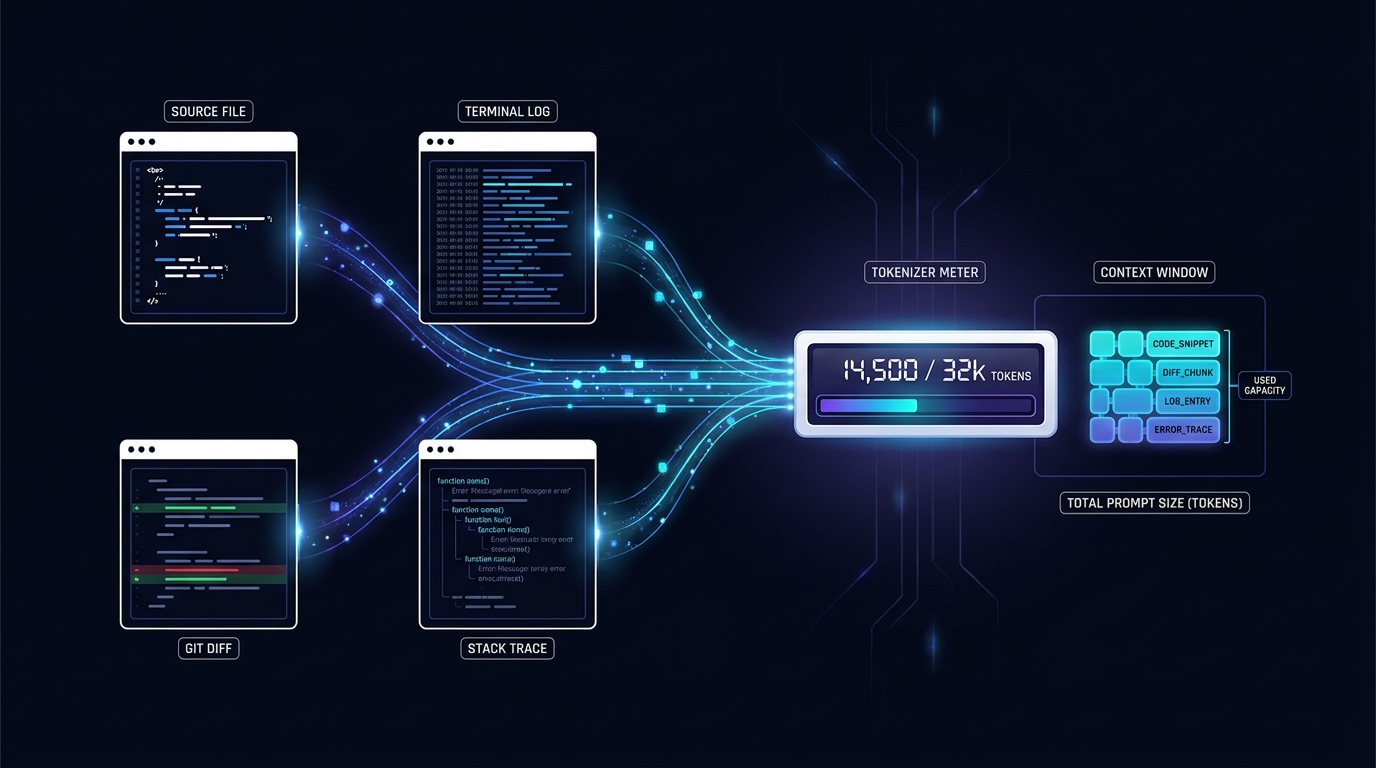
Token counting for code prompts gets unreliable as soon as a request includes more than one clean source file. A realistic debugging prompt may combine system instructions, repository context, a Git diff, terminal logs, a stack trace, tool schemas, and a response format. Counting only the visible code block can therefore understate the actual request.
The safe method is simple: build the exact request, count it with the tokenizer used by the target model when that tokenizer is available, then validate the live request against the endpoint’s reported usage. Do not estimate from words, lines, bytes, or a universal characters-per-token ratio.
This guide gives you a repeatable workflow for files, diffs, logs, and stack traces, plus four compact fixtures you can test against your own endpoint with TokenTest.
Why code prompt token counts are easy to misjudge
Tokens are not the same as words or characters. A tokenizer can split punctuation, indentation, identifiers, whitespace, Unicode text, and special markers differently. The same visible text can also produce a different final input count when a provider applies a chat template or adds model-specific control tokens.
That is why token counting for code prompts needs three separate numbers:
- Artifact tokens: the file, diff, log, or trace you want the model to inspect.
- Request tokens: the artifact plus system instructions, user instructions, message roles, tool definitions, schemas, and other request content.
- Reported input tokens: the usage returned by the live endpoint for the completed request.
The third number is the operational result for that call. The first two help you explain and reduce it.
OpenAI’s current token-counting guide makes the same core distinction: local tokenization can count strings, while an exact API count can account for structured inputs such as messages, images, files, tools, and schemas. Hugging Face’s chat-template documentation also shows why message formatting matters: chat messages are converted into a model-specific sequence with control tokens before generation.
Count the request, not just the pasted code
Before comparing prompts, serialize every input layer that can reach the model:
system or developer instructions
+ user task
+ repository/file context
+ Git diff
+ logs
+ stack trace
+ tool definitions and JSON schemas
+ response-format schema
+ provider chat-template overhead
= actual model input
If you count only the artifact, label the result artifact_tokens. Do not present it as the full prompt total.
For reproducible token counting for code prompts, store a small manifest with every test:
{
  "test_id": "checkout-null-pointer-01",
  "requested_model": "your-model-id",
  "artifact_type": "stack_trace",
  "artifact_bytes": 982,
  "artifact_tokens_local": null,
  "request_tokens_local": null,
  "input_tokens_reported": null,
  "cached_input_tokens": null,
  "output_tokens_reported": null,
  "finish_reason": null,
  "task_valid": null
}
Use null when a field is not reported. Keep a real zero as 0; it means something different.
1. Token counting for source files
Source files contain more than executable logic. Imports, comments, long identifiers, generated code, embedded data, test fixtures, and repeated boilerplate can dominate the prompt.
Use this order:
- Start with the exact file version used in the failing build or review.
- Keep imports, declarations, and nearby callers that are needed to resolve names and data flow.
- Remove unrelated generated, vendored, minified, lockfile, or snapshot content before removing relevant logic.
- Add the task instruction and file path before counting.
- Count the final request again after adding tools or a structured response schema.
Paste-ready source-file fixture
Task: Find the bug and propose the smallest safe patch. Explain the failure path before showing code.

File: src/cart/applyCoupon.ts
```ts
type Coupon = { code: string; percentOff?: number };

export function applyCoupon(total: number, coupon: Coupon | null) {
  if (coupon.percentOff) {
    return total - total * (coupon.percentOff / 100);
  }
  return total;
}
```
Run this exact message through the endpoint you plan to use. The point is not the fixture’s absolute token count; it is whether your local count, request count, and endpoint-reported usage reconcile.
2. Token counting for Git diffs
A diff is often smaller than a full file, but it carries syntax that a simple line count misses: file headers, index lines, hunk headers, + and - prefixes, and unchanged context.
Git’s official git diff documentation lets you control the number of context lines with -U<n> or --unified=<n>. That makes context width a measurable prompt-budget choice rather than an arbitrary cleanup step.
For token counting for code prompts built from diffs:
- Keep filenames and hunk headers so the model knows where the change belongs.
- Keep enough unchanged context to resolve variables, branches, and function boundaries.
- Reduce context deliberately, for example from
-U10to-U3, and recount. - Do not strip
+and-prefixes before counting if the model will receive them. - Include the review instruction, repository rules, and output schema in the final request count.
Paste-ready Git diff fixture
Task: Review this patch for correctness, regression risk, and missing tests.

diff --git a/src/retry.ts b/src/retry.ts
index 2a1c020..4bc4410 100644
--- a/src/retry.ts
+++ b/src/retry.ts
@@ -8,7 +8,9 @@ export async function retry<T>(fn: () => Promise<T>) {
   for (let attempt = 0; attempt < 3; attempt++) {
     try {
       return await fn();
-    } catch {}
+    } catch (error) {
+      if (attempt === 2) throw error;
+    }
   }
 }
Save both the diff command and the generated diff in your test record. Otherwise a later run may silently use different context.
3. Token counting for logs
Logs grow through repetition. Timestamps, request IDs, hostnames, JSON keys, health checks, and retry messages may repeat thousands of times while adding little diagnostic value.
The risky shortcut is deleting all repeated lines. Repetition frequency and timing can be the evidence for a retry loop, rate limit, race condition, or cascading failure.
Use a loss-aware reduction instead:
- Preserve the first occurrence, last occurrence, and lines around the failure boundary.
- Replace only exact, consecutive repeats with a marker such as
[same line repeated 184 times]. - Keep the repeat count and time range.
- Preserve correlation IDs when they connect services.
- Count both the raw excerpt and reduced excerpt so the savings are visible.
Paste-ready log fixture
Task: Identify the first actionable failure and separate root cause from retries.

2026-07-24T08:41:02.013Z INFO  request_id=7f2 checkout started
2026-07-24T08:41:02.087Z WARN  request_id=7f2 inventory timeout attempt=1
2026-07-24T08:41:02.291Z WARN  request_id=7f2 inventory timeout attempt=2
2026-07-24T08:41:02.697Z ERROR request_id=7f2 inventory timeout attempt=3
2026-07-24T08:41:02.699Z ERROR request_id=7f2 checkout failed code=INVENTORY_UNAVAILABLE
For production logs, test at least three prompt shapes: the full incident window, a reduced failure-centered window, and a summary plus the raw tail. Compare task validity as well as token use.
4. Token counting for stack traces
Stack traces combine exception messages, paths, line numbers, framework internals, nested causes, and repeated async boundaries. The most useful frame is not always the first frame, and the root cause may sit under Caused by or another nested-exception marker.
For token counting for code prompts with stack traces:
- Keep the exception type and message.
- Keep the first application frames and the transition into framework code.
- Keep every nested-cause boundary.
- Normalize machine-specific absolute paths only if the path itself is irrelevant.
- Do not remove line numbers when the model can map them to supplied source.
- If the same framework tail repeats, preserve one copy and record how many times it repeated.
Paste-ready stack-trace fixture
Task: Trace the likely root cause and name the first source file to inspect.

TypeError: Cannot read properties of null (reading 'percentOff')
    at applyCoupon (/app/src/cart/applyCoupon.ts:4:14)
    at calculateTotal (/app/src/cart/calculateTotal.ts:27:10)
    at checkout (/app/src/checkout/checkout.ts:61:18)
    at processTicksAndRejections (node:internal/process/task_queues:95:5)
When you attach the referenced source file, recount the combined request. The trace and file are separate artifacts, but the model receives one total input.
A practical measurement workflow with TokenTest
TokenTest is an endpoint-testing and token-behavior tool, not a generic paste-text tokenizer. Use it to validate what your OpenAI-compatible endpoint reports and how it behaves under boundary conditions.
- Put one fixture into the exact message structure your application sends.
- Run it against the endpoint and model you are evaluating.
- Use TokenTest’s tokenizer probe, truncation, max-output, or related tests to inspect token behavior.
- Compare the raw response with TokenTest’s normalized usage fields.
- Record requested and returned model IDs, reported input/output totals, finish reason, latency, and whether the answer actually completed the task.
- For offline review, paste the endpoint’s response or saved report JSON into TokenTest’s manual JSON analysis mode.
This separates two questions that teams often mix together:
- How many tokens does my local tokenizer predict?
- What usage and boundary behavior does this endpoint actually report?
If those numbers disagree, inspect the request wrapper, chat template, special tokens, tool schemas, response schema, cache fields, and model mapping before assuming either side is wrong.
Build a prompt budget by artifact, then verify the total
A useful budget sheet keeps each component visible:
| Component | Raw size | Local tokens | Included? | Reduction rule |
|---|---|---|---|---|
| System/developer instructions | — | — | Yes | Keep stable across tests |
| User task | — | — | Yes | Keep success criteria explicit |
| Source files | — | — | Yes | Remove unrelated generated/vendor content |
| Git diff | — | — | Yes | Tune unified context deliberately |
| Logs | — | — | Yes | Collapse exact repeats with counts |
| Stack trace | — | — | Yes | Keep causes and application frames |
| Tool/schema overhead | — | — | If used | Count the exact definitions |
| Output reserve | — | — | Yes | Protect enough room for a valid answer |
Add an output reserve before filling the remaining context with optional repository material. A request that fits the input limit can still fail if it leaves too little room for the answer.
Common mistakes
Using a fixed characters-per-token ratio
Ratios can be rough planning hints for a known corpus, but code punctuation, whitespace, identifiers, and mixed languages make a universal ratio unsafe. Calibrate against your own artifacts and tokenizer.
Counting before adding tools and schemas
Tool definitions and structured-output schemas are input. Count the final payload, not an earlier text-only draft.
Comparing different prompts across models
If the wrappers, file selection, diff context, or log reduction changes, you are no longer comparing tokenizers on the same task.
Treating reported zero as missing
Store missing data as null. Preserve 0 exactly as returned so downstream analysis does not invent usage.
Optimizing tokens while ignoring answer validity
A shorter prompt is not more efficient if it removes the frame, diff context, or log sequence needed to solve the problem. Score task completion before declaring a prompt better.
Token counting for code prompts: final checklist
Before sending a large engineering prompt:
- [ ] Pin the exact model or endpoint configuration.
- [ ] Save the complete structured request.
- [ ] Separate artifact tokens from request tokens.
- [ ] Count with the model’s tokenizer when available.
- [ ] Preserve chat-template, tool, and schema overhead.
- [ ] Reduce files, diffs, logs, and traces with explicit rules.
- [ ] Keep a protected output reserve.
- [ ] Capture raw and normalized usage.
- [ ] Preserve
nulland0distinctly. - [ ] Verify that the response completed the engineering task.
FAQ
How do I count tokens in a code file?
Count the exact file content with the target model’s tokenizer, then count the complete request after adding the task, message roles, system instructions, tools, and schemas. Label the file-only result separately from the request total.
Is a Git diff always cheaper than sending the full file?
Not always. A focused diff is often smaller, but wide unified context, multiple files, long paths, and verbose instructions can make it larger than expected. Measure both prompt shapes on the same task.
Should I remove timestamps and IDs from logs?
Remove or normalize them only when they do not carry diagnostic meaning. Keep values that establish ordering, latency, retries, or cross-service correlation.
Can I delete framework frames from a stack trace?
You can reduce repeated framework tails, but keep the boundary between application and framework code, nested causes, exception messages, and any frame needed to map back to supplied source.
Why does local token counting differ from API usage?
Common causes include a different tokenizer or model revision, provider-added chat formatting, special tokens, hidden request fields, tool or schema serialization, attachments, cache accounting, and endpoint model remapping.
Can I paste these fixtures directly into TokenTest?
Use the fixtures as the exact prompt content sent to your endpoint. Then inspect the endpoint with TokenTest. You can also paste saved response or report JSON into TokenTest’s manual JSON analysis mode for offline review.
Measure the prompt your model actually receives
Token counting for code prompts becomes useful when it is reproducible. Save the request, record the reduction rules, capture live usage, and validate the answer. Then use TokenTest to compare token reporting and boundary behavior before a large file, diff, log, or stack trace reaches production.
Explore more practical guides in the TokenTest blog.