How to Inspect Token-Heavy Prompt Sections Before Optimization
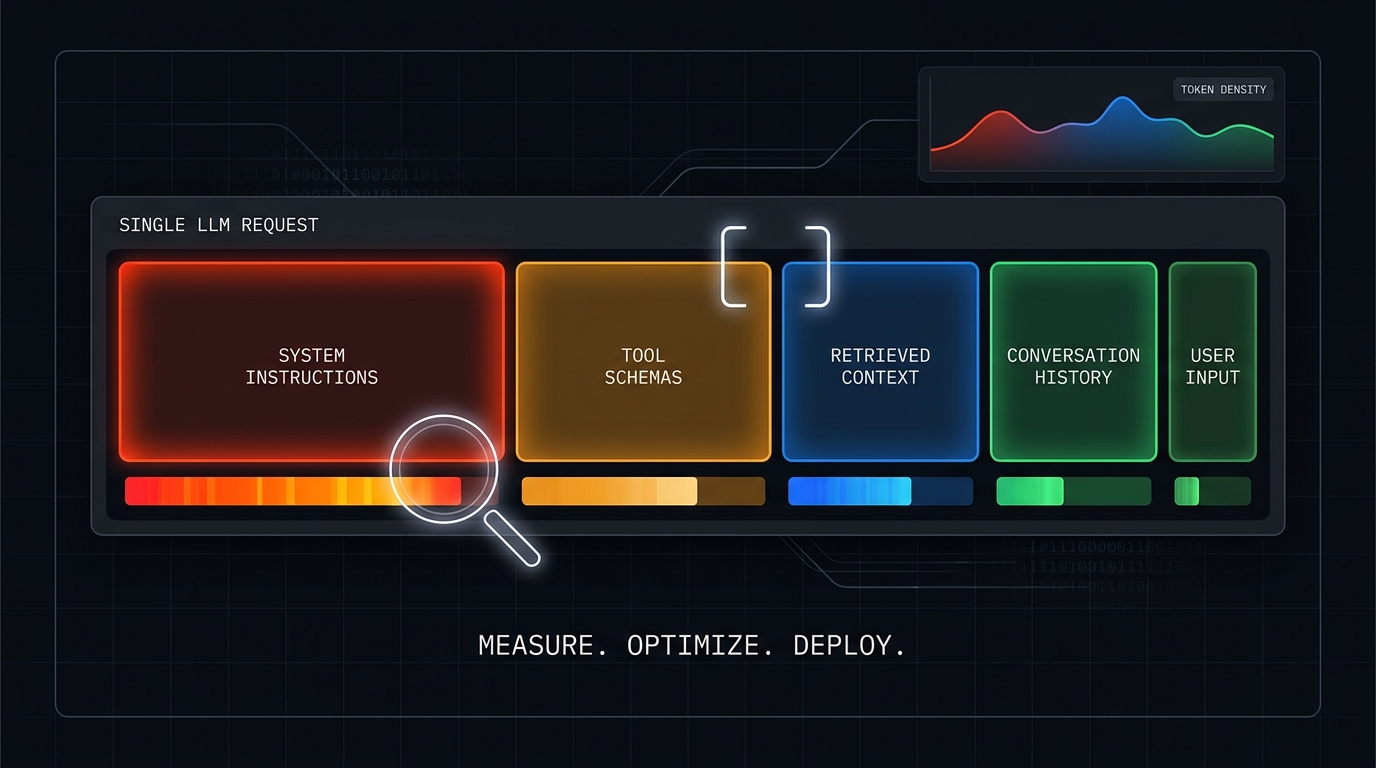
When an LLM request gets expensive or approaches its context limit, the first instinct is often to shorten the longest-looking paragraph. That can save very little—or remove instructions that protect quality—because characters, words, and tokens are not interchangeable.
A safer approach is to inspect token-heavy prompt sections before optimization. Divide the complete request into measurable components, establish a baseline, remove or replace one component at a time, and compare the resulting input-token counts. Only then should you decide what to compress, retrieve on demand, summarize, or delete.
This guide gives you a repeatable prompt token breakdown workflow, a paste-ready test fixture, and a review table you can use before shipping prompt changes.
What counts as a prompt section?
For this audit, a prompt section is any component that can be isolated without changing the rest of the test request. Common sections include:
- system instructions;
- developer instructions or framework wrappers;
- tool definitions and JSON Schemas;
- few-shot examples;
- retrieved documents;
- conversation history;
- user input;
- response-format schemas;
- repeated metadata, policies, or templates.
Do not inspect only the text visible in your prompt editor. The serialized request sent to the model may include tool schemas, hidden framework messages, retained history, and generated retrieval context. Your baseline should represent that complete request.
Why visual length is a poor optimization signal
Tokenization depends on the tokenizer and model family. Punctuation, whitespace, code, JSON, URLs, identifiers, and different languages can split differently. A short tool schema with many field names may consume more tokens than a longer paragraph of plain English.
Provider-side counting is the best preflight reference when it is available. OpenAI documents an input-token counting endpoint for Responses requests, Anthropic provides a message token-counting endpoint, and Gemini exposes countTokens. Offline tokenizers such as tiktoken are useful for supported encodings, but their result should not be treated as a universal count for every provider or model.
The practical rule is simple: compare the same serialized request with the same target model and change one section at a time.
How to inspect token-heavy prompt sections in seven steps
1. Capture the full production-shaped request
Start with a representative request from the real workflow. Include the system and developer layers, selected tools, response schema, typical retrieval, realistic history, and a normal user message.
Remove secrets and personal data, but preserve the structure. If production can route to several tool sets or retrieval sizes, create a separate baseline for each important path.
2. Add stable section boundaries
Copy each component into a fixture with explicit markers. The markers make review easier and help prevent accidental cross-section edits.
<<<SYSTEM>>>
You are a support assistant. Follow the refund policy and return JSON.
<<<END_SYSTEM>>>

<<<TOOLS>>>
[Paste the serialized tool definitions or schema here.]
<<<END_TOOLS>>>

<<<EXAMPLES>>>
[Paste the few-shot examples here.]
<<<END_EXAMPLES>>>

<<<RETRIEVAL>>>
[Paste the retrieved passages here.]
<<<END_RETRIEVAL>>>

<<<HISTORY>>>
[Paste representative conversation history here.]
<<<END_HISTORY>>>

<<<USER>>>
Can I return an opened item after 21 days?
<<<END_USER>>>
These labels add a small amount of test-only overhead. Keep them identical across variants so the deltas remain comparable.
3. Measure the complete baseline
Count the full request with the actual model-facing method:
- Use the provider's preflight token-counting endpoint when available.
- Otherwise use the tokenizer specified for that model.
- After a live request, save the endpoint's reported input and output usage.
Record the model ID, tokenizer or counting method, request path, date, and baseline input-token count. A number without its model and method is not reusable evidence.
4. Run controlled subtraction variants
Create copies of the baseline and remove exactly one section from each copy. Do not rewrite several sections at once.
| Variant | Single change | What the delta estimates |
|---|---|---|
| Full baseline | None | Total production-shaped input |
| No tools | Remove tool definitions | Tool and schema overhead |
| No examples | Remove few-shot examples | Demonstration overhead |
| No retrieval | Remove retrieved passages | Retrieval overhead |
| No history | Remove retained turns | Conversation-history overhead |
| Minimal system | Keep only critical invariants | Potentially compressible instruction overhead |
Calculate each section estimate as:
estimated section tokens = baseline input tokens - variant input tokens
This is an estimate, not a mathematical decomposition of the model's internals. It is useful because the serialized input is controlled and the changed component is known.
5. Rank sections by tokens and repetition
A large one-time section is not always the biggest cost. Add how often each section is sent.
repeated token exposure = estimated section tokens × applicable calls × retry ceiling
For example, a 900-token tool schema sent to 20 calls creates more input exposure than a 6,000-token reference included once. In agent workflows, inspect the call graph rather than optimizing only the first request.
Use two rankings:
- per-request weight, which finds context-window pressure;
- repeated exposure, which finds workflow cost and latency pressure.
6. Validate the result with TokenTest
TokenTest.io provides two useful checks after you identify the heavy sections.
First, run the relevant endpoint through a TokenTest evaluation and inspect the token-integrity results. The current D4 checks look for usage presence, total consistency, input monotonicity, output reasonableness, stop-limit linkage, streaming usage, and cache-token evidence. This helps verify that the live endpoint reports token behavior plausibly after your request changes.
Second, use Advanced → protocol & offline analyze to paste a raw response JSON. The analyzer can inspect whether a response includes model and usage evidence without sending an API key.
Paste this baseline example into the offline analyzer:
{
  "id": "prompt_audit_before",
  "model": "your-model-id",
  "content": [
    {"type": "text", "text": "AUDIT_OK 7e42b9"}
  ],
  "usage": {
    "input_tokens": 8420,
    "output_tokens": 34
  }
}
Then paste the response from one controlled variant:
{
  "id": "prompt_audit_no_retrieval",
  "model": "your-model-id",
  "content": [
    {"type": "text", "text": "AUDIT_OK 7e42b9"}
  ],
  "usage": {
    "input_tokens": 5160,
    "output_tokens": 33
  }
}
The 3,260-token input difference suggests that the removed retrieval section was the dominant component in this controlled example. Use real responses and your actual model ID for production decisions. The pasted sample demonstrates the comparison method; it is not a benchmark or a provider pricing claim.
For a broader live-endpoint debugging workflow, read How TokenTest.io Helps Debug Expensive Prompts Before Deployment.
7. Optimize the heaviest safe target first
The largest section is not automatically the first section to delete. Rank each candidate by four factors:
| Section | Estimated tokens | Repetition | Behavior risk if changed | Best first action |
|---|---|---|---|---|
| Duplicate instructions | High | Every call | Low–medium | Deduplicate |
| Tool schemas | Medium–high | Tool-enabled calls | Medium | Route tools before loading |
| Retrieval | High and variable | Retrieval calls | Medium | Cap, rerank, or retrieve on demand |
| Few-shot examples | Medium | Every applicable call | Medium–high | Remove redundant examples |
| History | Growing | Later turns | Medium–high | Summarize at thresholds |
| Core safety or format rules | Often small | Every call | High | Preserve and regression-test |
Prefer the change with a large measured delta and a low behavior risk. Test task success, safety, formatting, tool selection, and answer quality after every optimization.
A reusable prompt section audit table
Copy this table into a pull request, prompt registry, or experiment log.
| Section | Included in baseline? | Variant count | Estimated tokens | Calls per run | Retry ceiling | Repeated exposure | Change proposed | Quality check |
|---|---|---|---|---|---|---|---|---|
| System | Yes | |||||||
| Developer/framework | Yes | |||||||
| Tools/schema | Yes | |||||||
| Few-shot examples | Yes | |||||||
| Retrieval | Yes | |||||||
| History | Yes | |||||||
| User input | Yes | |||||||
| Response schema | Yes |
Save the full fixture and the results together. A later prompt edit can then be compared against the same baseline instead of relying on memory.
Common mistakes when analyzing prompt token usage
Counting source files instead of the serialized request
Frameworks may inject wrappers, selected tools, schema descriptions, or history after your source prompt is loaded. Inspect what is sent, not only what is authored.
Changing multiple sections in one test
If you shorten the system prompt, remove examples, and cap retrieval in the same variant, you cannot tell which change produced the reduction or broke behavior.
Comparing different models or tokenizers
Keep the target model and counting method constant during a component audit. Re-run the complete audit when you migrate models.
Optimizing by tokens without testing outcomes
A smaller prompt can be worse. Preserve a small regression set that checks required constraints, expected tool calls, output structure, and representative edge cases. The token-aware prompt review process shows how to turn these checks into a repeatable release gate.
Ignoring multilingual variants
Do not assume an English prompt and its Chinese version have proportional token counts. Count each localized request with the actual target model. See Why Chinese Prompts Can Use Different Token Budgets Than English Prompts for a dedicated comparison workflow.
Frequently asked questions
Can I calculate each prompt section exactly?
You can measure exact counts for independently serialized components with a compatible tokenizer, but complete chat requests may add provider-specific formatting or wrappers. Controlled subtraction against the full request is usually the more operationally useful estimate.
Should I optimize the system prompt first?
Only if measurement shows that it is a major contributor and tests show it can be changed safely. Tool schemas, retrieval, history, or repeated examples may be heavier.
Does TokenTest replace a provider token counter?
No. Use provider preflight counts or the correct tokenizer for input planning. Use TokenTest to inspect live endpoint behavior, usage integrity, and raw response evidence after changes.
How often should I rerun the audit?
Rerun it when the model, tokenizer, tool set, retrieval policy, response schema, prompt template, or history strategy changes. It is also useful as a pre-merge check for large prompt edits.
Inspect first, optimize second
The reliable way to inspect token-heavy prompt sections is to measure a complete baseline, subtract one component at a time, rank the resulting deltas by repetition and risk, and verify the final request against live usage evidence.
Do not begin with the section that merely looks longest. Begin with the section that is measurably heavy, frequently repeated, and safe to change. Open TokenTest.io, test your endpoint or paste a raw response, and turn the result into a documented prompt budget before the next optimization ships.