Blog Automation Testing: 7 CI Test Layers Compared
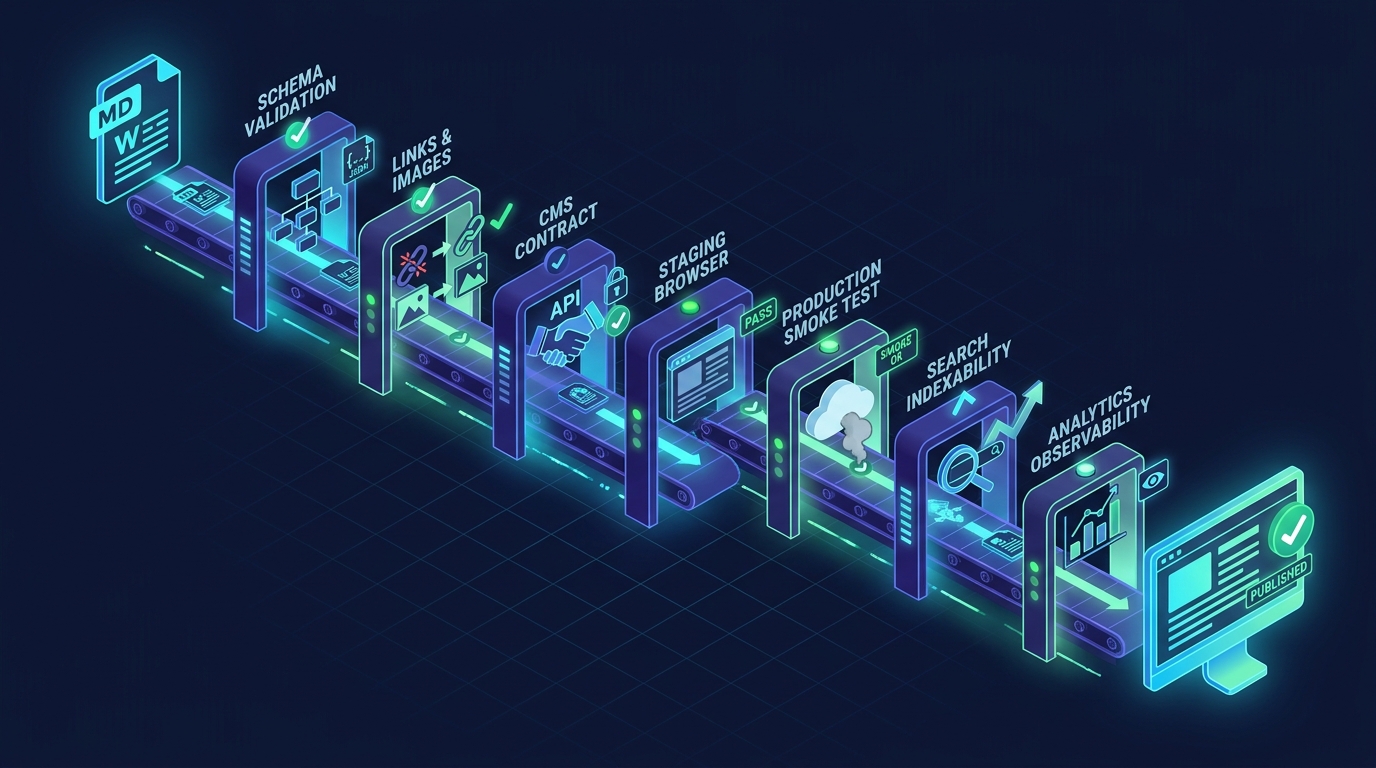
Publishing automation can fail while every individual API call appears successful. A draft can pass linting but lose its canonical URL in the CMS. A publish request can return 200 while the public route serves a stale page. A translated article can exist in the database while its localized URL returns 404.
That is why a useful blog automation test comparison and alternatives guide should compare test layers, not just automation products. The practical question is not “Which tool can publish a post?” It is “Which combination of tests proves that the right content became a healthy, indexable, measurable public page?”
This guide compares seven layers of blog automation testing, explains what each layer catches, and shows how to combine them into a CI release gate without turning the workflow into a slow end-to-end test suite.
Quick Comparison: Seven Blog Automation Test Layers
| Test layer | Best at catching | Typical execution point | Speed | Main limitation |
|---|---|---|---|---|
| 1. Content contract tests | Missing fields, invalid front matter, bad slugs | Before CMS calls | Very fast | Cannot prove rendering or publication |
| 2. Link and asset tests | Broken links, missing images, inaccessible media | Before publish and after render | Fast | External links can be transient |
| 3. CMS integration tests | Field mapping, auth, draft creation, category errors | Staging or isolated CMS | Medium | Still does not prove the public route |
| 4. Staging browser tests | Layout, metadata rendering, navigation, responsive issues | Preview or staging | Medium-slow | Staging may differ from production |
| 5. Production smoke tests | Route status, visible title, deployed asset availability | Immediately after publish | Fast if narrowly scoped | Tests only selected critical paths |
| 6. Search indexability tests | Canonical, noindex, robots directives, sitemap presence |
After publish | Fast | Cannot guarantee search-engine indexing |
| 7. Analytics observability tests | Missing measurement, wrong campaign tags, silent funnel gaps | After publish | Medium | Event arrival may be delayed |
The layers are alternatives only when your risk is narrow. For a production publishing workflow, they are usually complements. The safest design runs cheap deterministic checks early, then uses a small number of browser and production checks after the CMS changes state.
What Counts as a Blog Automation Test?
A blog automation test is an automated assertion about an artifact or state in the publishing pipeline. The assertion should produce evidence: a pass/fail result, response body, screenshot, route status, or structured readback record.
The pipeline normally has five state transitions:
- A source document becomes a validated content package.
- The package becomes a CMS draft.
- The draft becomes a published CMS record.
- The record becomes a public web route.
- The public route becomes discoverable and measurable.
Each transition can fail independently. Testing only the generated Markdown leaves four transitions unverified. Testing only the final page makes failures harder to diagnose because the workflow has already crossed every earlier boundary.
For a broader comparison of manual review, workflow tools, CI, and publishing agents, see Blog Automation Test: Comparison and Alternatives. The rest of this guide focuses on how to build the test stack itself.
1. Content Contract Tests
Content contract tests validate the article package before it reaches the CMS. They are the cheapest tests in the pipeline and should run on every content change.
A contract can require:
- A non-empty title, slug, language, excerpt, and meta description.
- A slug that matches a lowercase, hyphenated pattern.
- A meta title and description within your editorial limits.
- Exactly one intended page title, with no duplicate body-level
<h1>. - An allowed category and language key.
- A canonical URL on the approved host.
- A real hero image rather than a local path or placeholder.
- Required citations for pricing, legal, product, or current claims.
Schema validators, unit-test frameworks, or small scripts can all handle this layer. The tool matters less than keeping the contract versioned beside the publishing code.
Choose content contract tests when: you need fast pull-request feedback and most failures are malformed inputs.
Do not use them as the only test when: the CMS transforms content, injects metadata, uploads assets, or generates localized routes.
2. Link and Asset Tests
Link tests answer two different questions:
- Is the destination syntactically valid and reachable?
- Did the final rendered page preserve the intended destination?
Run source-level checks first. Reject empty href values, local filesystem references, unsupported URL schemes, and image paths that the public site cannot access. Then repeat a smaller check against the rendered page because CMS sanitization or Markdown conversion can modify URLs.
Treat external links carefully. A third-party server can rate-limit a CI runner or fail temporarily. Use timeouts, limited retries, and a distinction between hard failures and warnings. Internal links, canonical URLs, and hero images deserve stricter treatment because your team controls them.
Choose link and asset tests when: articles include many internal references, generated citations, uploaded media, or translated routes.
Alternative: a scheduled crawler can find broken links after publication, but it provides slower feedback than release-time checks. The strongest setup uses both: release checks for the new page and a crawler for site-wide decay.
3. CMS Integration Tests
CMS integration tests verify the boundary between your content package and the publishing API. They should confirm more than authentication.
Useful assertions include:
- The selected category exists and belongs to the intended site.
- Draft creation returns a persistent post ID.
- Readback preserves title, slug, language, metadata, and cover image URL.
- Publishing changes the CMS status from draft to published.
- Retrying with the same idempotency strategy does not create duplicates.
- Translation requests use configured language keys and remain associated with the source post.
- API errors are stored with enough context to diagnose the failed stage.
An integration test should use a dedicated staging site or a clearly removable test record when possible. Mocking is valuable for local development, but a mock cannot reveal a changed authentication requirement, renamed field, invalid category ID, or server-side sanitizer.
If your CMS is Blogger-based, the Blogger integration test implementation checklist provides a focused sequence from payload validation through public readback.
Choose CMS integration tests when: the publishing API or field mapping is a frequent source of failures.
Alternative: contract mocks are faster and safer for every commit. Use them for routine feedback, then run a smaller real integration suite before release or on a schedule.
4. Staging Browser Tests
Browser tests validate what readers and crawlers receive after templates, Markdown conversion, and client-side behavior are applied. Playwright supports web-first assertions that wait for expected conditions, which is useful when a preview route renders asynchronously.
A focused staging test can verify:
- The route loads without an application error.
- The page has one visible title.
- The meta title, description, and canonical tag match the package.
- The hero image loads and has useful alternative text.
- The table of contents and important internal links work.
- Code blocks and comparison tables remain readable.
- The page works at a representative mobile viewport.
- Structured data, when used, contains the expected article values.
Avoid turning every paragraph into a brittle selector assertion. Test the contract readers depend on, not the exact DOM structure of the theme.
Choose staging browser tests when: templates, rendering, client-side hydration, or responsive layout can break an otherwise valid CMS record.
Alternative: visual snapshots can catch unexpected presentation changes, but they need baseline maintenance and can produce noisy diffs. Combine a few semantic assertions with visual checks on high-value templates.
5. Production Smoke Tests
Production smoke tests run immediately after publication and answer one question: did the critical public experience become available?
Keep this suite short. A good smoke test checks:
- The source public URL returns
200. - Each required localized route returns
200. - The canonical URL points to the correct route.
- The page is not a generic error page or empty shell.
- The expected title or stable article identifier is present.
- The cover image returns a successful response.
The test should use the public hostname, not an internal API response. This catches deployment lag, routing errors, CDN issues, and mismatches between CMS state and the frontend.
Choose production smoke tests when: publication is automated and the workflow must not report success before the live page is verifiable.
Alternative: uptime monitoring detects later outages, but it does not replace an immediate release check. Use the smoke test to gate completion and monitoring to detect regression after the release.
6. Search Indexability Tests
A 200 response does not mean a page is eligible for indexing. Search validation should inspect the signals your publishing system controls.
At minimum, test:
- The canonical link exists and resolves to the intended absolute URL.
- The page does not include a
noindexrobots directive. robots.txtdoes not block the route required for crawling.- The source and localized pages use distinct canonicals when each is intended to rank.
- The route is included in the appropriate sitemap or discovery path.
- Redirects do not create a canonical loop or send crawlers to a different slug.
Google documents canonicalization as a way to indicate the representative URL among duplicate or similar pages, and documents noindex as a page-level method for preventing indexing. Your test can verify that these directives are configured correctly, but it cannot promise when or whether a search engine will index the page.
Choose indexability tests when: SEO traffic is a success metric and your CMS, localization layer, or deployment framework can change metadata.
Alternative: manual URL inspection tools are useful for diagnosis, but they are too slow for every automated release. Run deterministic HTML checks in CI, then use search-console inspection selectively.
7. Analytics Observability Tests
Publishing is not fully observable if the article loads but its acquisition and conversion path disappears from analytics.
Analytics tests can validate:
- The expected measurement tag is present on the production page.
- Campaign parameters survive redirects.
- Key calls to action use the intended destination.
- A synthetic page view or test event uses a recognizable debug marker.
- The reporting layer receives the expected event within a defined window.
- Alerting distinguishes “article published” from “article measurable.”
Do not send uncontrolled synthetic conversions into production reporting. Use a debug mode, test property, filter, or explicit marker that analysts can exclude. Google Analytics provides validation tooling for Measurement Protocol events, but validation success is not the same as confirming the complete browser-side user journey.
Choose analytics observability tests when: success is measured through engaged sessions, signups, downloads, or another article-assisted conversion.
Alternative: tag scanners prove that code exists on the page; synthetic events provide stronger evidence that data can traverse the collection path.
Which Alternative Should You Choose?
Use the risk, not the feature list, to choose your test stack.
Small site with manual publishing
Start with content contracts, link checks, and a manual preview checklist. Add a production route check because it costs little and catches a different class of failure.
CMS API automation
Add real CMS integration tests, idempotent retry checks, API readback, and production smoke tests. A successful create response is not a sufficient completion condition.
Multilingual publishing
Add language-key validation, per-language publish evidence, localized route checks, canonical checks, and source-to-translation association tests. Run translation publication one language at a time when the API is synchronous or prone to timeout.
AI-generated content pipeline
Add deterministic content rules before any subjective quality evaluation. Validate required sections, citations, prohibited internal notes, output format, and token or cost budgets. Human review or model-based evaluation can then focus on claims, usefulness, and voice instead of missing fields.
High-volume SEO program
Add scheduled crawls, synthetic monitoring, analytics validation, sitemap checks, and rollback procedures. Store structured evidence for each stage so operators can identify whether a failure occurred in generation, the CMS, rendering, deployment, search metadata, or measurement.
A Minimal CI Workflow That Covers the Critical Risks
GitHub Actions and other CI systems can run this sequence, but the design is platform-neutral:
- Validate the package. Check schema, slug, required metadata, language, category, canonical host, and content policies.
- Check controlled dependencies. Validate internal links, public image inputs, and referenced local assets.
- Create the draft. Store the post ID and raw response as artifacts.
- Read the draft back. Compare critical fields with the source package.
- Publish the source and translations. Record each language independently.
- Request the public routes. Require
200, the expected canonical, and a stable article marker. - Validate indexability. Fail on unintended
noindex, canonical mismatch, or blocked route. - Check measurement. Confirm the expected analytics instrumentation or a safe synthetic event.
- Emit one completion record. Include post IDs, URLs, asset URL, test outcomes, and failed attempts.
GitHub describes continuous integration as frequently committing code and running automated builds and tests. The same principle applies to content infrastructure: version the publishing contract and run the cheapest relevant assertions whenever the workflow changes.
Common Blog Automation Testing Mistakes
Treating all failures as retryable
A timeout may be retryable. An invalid category, missing credential, rejected language key, or malformed payload is not. Classify failures before retrying, and cap attempts to prevent duplicate posts or assets.
Running only end-to-end tests
End-to-end tests are valuable but slower and harder to diagnose. A layered suite identifies failure closer to its cause and keeps routine feedback fast.
Trusting CMS state without public readback
The CMS can say “published” while the frontend route is unavailable. Completion should require both CMS state and public evidence.
Ignoring indexability
A live page with an accidental noindex or incorrect canonical can remain invisible to search. Treat these values as release fields, not post-publication cleanup.
Measuring publication but not outcomes
Published URL count is an operational metric. Engaged sessions and qualified conversions are outcome metrics. Your automation should expose both without claiming that one proves the other.
Final Recommendation
The best blog automation testing strategy is layered:
- Use contract and link tests for fast, deterministic feedback.
- Use real CMS integration tests for state transitions and field mapping.
- Use browser tests for rendered behavior.
- Use production smoke tests before declaring publication complete.
- Use indexability and analytics checks to protect SEO and measurement.
- Use scheduled monitoring for failures that appear after release.
If you are choosing between alternatives, begin with the failure that would be most expensive or hardest to notice. Then add the cheapest test that detects it before readers do.
For a reusable editorial control model, see the Content Publishing QA workflow playbook. If AI generates or localizes your articles, also track prompt size and token growth as regression signals so higher publishing volume does not silently increase context risk or cost.