What Is Technical SEO Automation and When Does It Matter?
What Is Technical SEO Automation and When Does It Matter?
Technical SEO automation is the practice of turning repeatable crawl, index, rendering, structured data, internal-link, sitemap, canonical, and publishing QA checks into scheduled or release-triggered workflows.
It matters when a site changes faster than a person can inspect it by hand. A small static site may only need occasional manual review. A growing blog, documentation site, ecommerce catalog, marketplace, multilingual content program, or AI-assisted publishing workflow needs technical SEO automation because one broken template can create hundreds of weak URLs before anyone notices.
The goal is not to automate SEO judgment. The goal is to automate the checks that should not depend on memory: whether important URLs are crawlable, whether noindex appeared unexpectedly, whether canonicals point to the right place, whether structured data is valid, whether a sitemap changed, whether localized routes return 200, and whether analytics can measure the page after it ships.
Technical SEO Automation in Plain English
Technical SEO automation uses scripts, APIs, crawlers, CI jobs, CMS hooks, or monitoring tools to inspect SEO-critical signals automatically. Instead of waiting for a quarterly audit, the team gets a signal when something important changes.
Typical automated checks include:
- crawlability and indexability checks for priority URLs;
robots.txt, meta robots, andx-robots-tagchanges;- canonical and redirect validation;
- sitemap presence, freshness, and URL coverage;
- broken internal links and orphaned page detection;
- structured data validation and schema drift;
- title, meta description, H1, and duplicate-template checks;
- localized route, hreflang, and canonical consistency checks;
- page speed, JavaScript rendering, and mobile usability regression checks;
- Search Console, analytics, and conversion instrumentation checks.
That list can look broad, so it helps to separate technical SEO automation into three jobs:
| Job | What automation checks | What humans still decide |
|---|---|---|
| Detect | Crawl errors, broken routes, missing tags, unexpected directives, schema changes | Which issues matter to users and revenue |
| Prevent | CI failures, release blockers, CMS required fields, template tests | Whether the blocker should delay the release |
| Measure | Indexed URL counts, impressions, clicks, conversions, refresh triggers | Whether the page deserves more content, links, or consolidation |
The best workflow combines all three. Detection without prevention creates alert fatigue. Prevention without measurement blocks obvious issues but misses business impact. Measurement without release QA discovers the problem after search visibility has already been damaged.
When Technical SEO Automation Matters Most
Technical SEO automation matters when SEO risk scales through repetition. A one-off mistake on one URL is annoying. A template-level mistake across 2,000 URLs is expensive.
Use technical SEO automation early when any of these conditions are true:
- Frequent publishing: articles, documentation, changelogs, or landing pages ship every week.
- Template-driven pages: many URLs share the same CMS template, frontend component, schema block, or route logic.
- Multilingual content: source and localized pages must keep canonicals, alternates, slugs, and metadata aligned.
- Programmatic SEO: new pages are generated from data, product inventory, locations, integrations, or customer segments.
- Migrations and redesigns: URL structures, redirects, internal links, and rendered HTML are changing together.
- AI-assisted content operations: prompts, source packs, localization, CMS payloads, and route checks happen in a chain.
- Multiple owners: engineering, content, SEO, and growth teams can each change part of the publishing system.
- Revenue-sensitive pages: organic landing pages assist signups, demos, purchases, or procurement decisions.
Technical SEO automation is less urgent when the site is small, rarely changes, and has a simple publishing path. In that case, a monthly crawl and a manual Search Console review may be enough. The threshold changes when the team cannot confidently answer, "What changed, which URLs were affected, and did those URLs remain crawlable and measurable?"
The Technical SEO Automation Decision Tree
Use this technical SEO automation decision tree before adding another tool or scheduled job.
| Question | If yes | If no |
|---|---|---|
| Does this issue repeat across templates, routes, locales, or releases? | Automate detection and add an owner. | Keep it as a manual review item. |
| Could the issue remove a page from search or split ranking signals? | Add a release blocker for priority URLs. | Use monitoring and weekly triage. |
| Can the expected state be expressed as a rule? | Put it in CI, CMS validation, or scheduled crawling. | Keep human editorial judgment. |
| Is the signal noisy without business context? | Pair the alert with URL priority, traffic, or conversion data. | Keep the check simple. |
| Would fixing it require content judgment? | Automate the evidence collection, not the decision. | Automate the full fix only if reversible. |
This is the practical boundary: automate facts, evidence, and regressions; review strategy, quality, and tradeoffs.
Google's guidance on helpful content is a useful guardrail here. Automation should support helpful, reliable, people-first pages; it should not become a way to mass-produce thin pages or bypass source review. Technical SEO automation can prove that a page is reachable and well-formed. It cannot prove that the page deserves to rank.
What to Automate First
Start technical SEO automation with the checks that are deterministic, high-impact, and easy to verify. These usually deliver more value than a broad dashboard full of low-priority warnings.
1. Crawl and Indexability Checks
Every priority URL should answer a few basic questions:
- Does the URL return
200? - Is it blocked by
robots.txtwhen it should be crawlable? - Does the page contain an unexpected
noindexdirective? - Does the canonical point to itself or the intended canonical URL?
- Does the rendered page contain the expected title, meta description, and main content?
This is where robots.txt deserves careful handling. Google documents that robots.txt manages crawler access and is mainly used to avoid overloading a site with crawler requests; it is not the right mechanism for keeping a page out of Google. If your workflow confuses "blocked from crawling" with "excluded from indexing," automation can create false confidence.
2. Sitemap and URL Inventory Monitoring
A sitemap helps search engines understand which pages and files are important and can include metadata such as the last updated date or alternate language versions. That makes sitemap monitoring a good automation target.
For a publishing workflow, track:
- whether the sitemap is reachable;
- whether new canonical URLs appear after publishing;
- whether deleted URLs disappear or redirect correctly;
- whether localized URLs are represented consistently;
- whether the sitemap's URL count changes unexpectedly.
For large sites, the sitemap is also a useful inventory source. If the sitemap, CMS, crawl, and analytics exports disagree, the automation should surface the mismatch before the team argues about performance.
3. Structured Data Validation
Structured data gives Google explicit clues about a page's meaning. It is also easy to break during template changes. A missing comma, stale field, duplicated entity, or wrong page type can remove rich-result eligibility or create misleading markup.
Automate structured data checks for:
- required fields by page type;
- JSON-LD parse errors;
- invalid dates, URLs, ratings, prices, or author fields;
- schema types that do not match the page;
- differences between source and localized pages.
Do not let automation invent schema facts. If the page does not visibly support a claim, the schema should not contain it.
4. Internal Links and Redirects
Internal links are one of the easiest things to damage during redesigns, CMS migrations, and content refreshes. Automation should catch:
- broken internal links;
- chains and loops;
- redirects from priority URLs;
- canonical pages with too few internal links;
- links pointing to weaker duplicate pages;
- localized pages that link back to the wrong language.
For a content program, this check should run both ways: the new article should link to relevant existing pages, and important existing pages should link forward when the new article becomes the best next step.
5. Publishing QA and Measurement
Publishing QA is where many teams underinvest. They prepare content, upload it, and assume the CMS handled the rest.
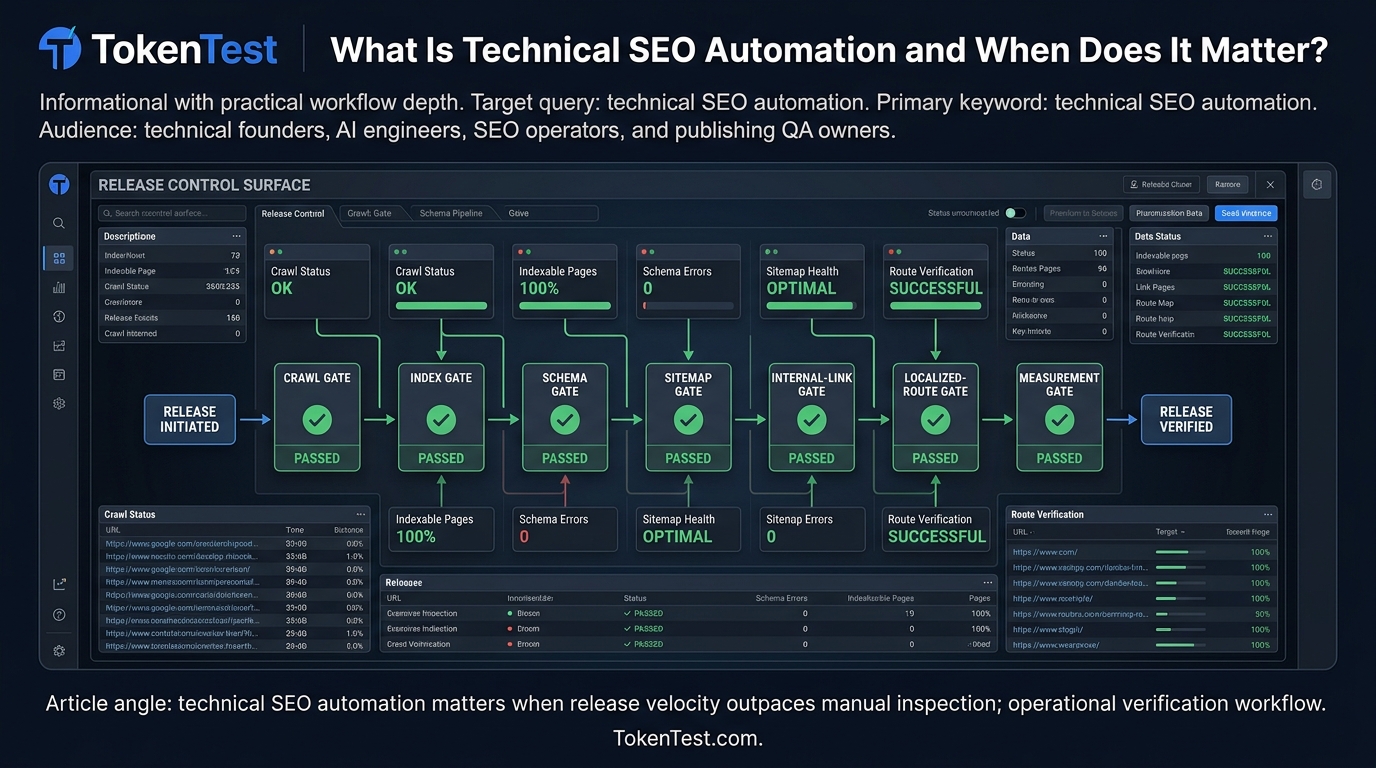
A practical technical SEO automation workflow should verify:
- source route returns
200; - localized route returns
200; - canonical URL is correct;
- title and meta description match the approved payload;
- cover image is public and has useful alt text;
- schema is present when expected;
- no page-level or header-level
noindexappears unexpectedly; - the URL is included in the right sitemap or feed;
- analytics and conversion events can attribute traffic from the page.
For AI-assisted publishing, add one more layer: token budget and prompt QA. Research, drafting, localization, metadata generation, and release checks can create long prompt chains. Token budgets help keep those workflows measurable before they become slow or expensive. For a deeper planning pattern, see TokenTest's content planning AI workflow.
A Practical Technical SEO Automation Workflow
Use this workflow for a blog, docs, or product-led content system.
- Define priority URL groups. Separate homepage, money pages, docs, blog, comparison pages, localized routes, and generated pages. Not every URL deserves the same alert threshold.
- Create a source-of-truth inventory. Combine CMS exports, sitemap URLs, crawled URLs, Search Console URLs, and analytics landing pages.
- Choose deterministic checks. Start with status code, indexability, canonical, title, meta, H1, sitemap presence, internal links, schema validity, and localized route status.
- Add release gates. For new pages, block publication when required CMS fields, cover image, category, canonical, or route checks are missing.
- Run scheduled crawls. Compare current results to the previous known-good state. Alert on meaningful deltas, not every minor warning.
- Attach business context. Prioritize affected URLs by impressions, clicks, conversions, backlinks, revenue, or strategic importance.
- Record fixes and regressions. Store the issue, owner, root cause, affected templates, first seen date, fix date, and validation evidence.
- Feed learnings back into templates. If the same issue recurs, turn the fix into a template test, CMS rule, or CI check.
The key is to make technical SEO automation part of release management. A report that arrives two weeks later is still useful, but a release gate that catches a broken canonical before deploy is better. If you need a broader publishing release model, pair this with the content publishing QA workflow.
Example Automation Gates for an AI Content Pipeline
For TokenTest's audience, the most relevant use case is AI-assisted publishing: a system that researches, drafts, localizes, uploads, and verifies articles or docs.
Here is a compact gate model:
| Stage | Automation gate | Failure action |
|---|---|---|
| Brief | Primary keyword, intent, source URLs, internal links, and proof needs are present | Return to planning |
| Draft | Unsupported claims, duplicate intent, missing sections, and token budget overrun are flagged | Revise before CMS |
| CMS payload | Slug, title, meta, category, canonical, body, image, and alt text are valid | Block publish |
| Route readback | Source and localized routes return 200; canonical and indexability pass | Hold distribution |
| Measurement | URL appears in tracking plan; Search Console and analytics baseline are recorded | Mark instrumentation gap |
| Refresh | Query performance, conversion assists, stale facts, and source changes are reviewed | Queue update or consolidation |
This is where TokenTest-style thinking is useful. TokenTest's product manual frames evaluation around production-reference evidence: identity and protocol integrity, output discipline, token metering credibility, safety boundaries, stability, reports, and exports. Content automation needs the same operating habit. Do not trust a chain because it ran; trust it because each step produced evidence that can be checked later. If prompts or agents are part of the system, add a token budget planning step before scaling.
Technical SEO Automation Tools: What Categories to Compare
Most teams do not need one giant platform on day one. Compare tool categories by the job they perform.
| Tool category | Best for | Watch out for |
|---|---|---|
| Crawlers | Finding broken links, directives, canonicals, duplicate tags, and rendered HTML issues | Large crawls can be noisy without URL priority |
| CI tests | Preventing template regressions before deploy | Tests must be fast and deterministic |
| CMS validation | Blocking missing fields, wrong categories, duplicate slugs, and incomplete metadata | Editorial teams need clear error messages |
| Search Console APIs and exports | Measuring queries, clicks, impressions, and URL-level visibility | Data can lag and does not replace crawl checks |
| Analytics | Connecting organic traffic to engagement and conversions | Attribution gaps can look like SEO failure |
| Log analysis | Seeing crawler behavior and server responses at scale | Requires clean logging and privacy controls |
| AI QA prompts | Reviewing source support, summaries, metadata, and localization | Must be paired with deterministic checks and token budgets |
The right stack depends on the failure mode. If deployments break tags, add CI tests. If the CMS ships incomplete pages, add CMS validation. If content gets published but not measured, improve analytics and Search Console baselines. If AI drafts create unsupported claims, add source review before publishing.
What Not to Automate
Technical SEO automation should not make every decision.
Keep humans in the loop for:
- deciding whether a page satisfies search intent;
- judging whether a claim is sufficiently sourced;
- choosing when to consolidate or delete content;
- interpreting competitive SERP changes;
- evaluating brand, legal, pricing, and compliance risk;
- deciding whether traffic growth is qualified or merely broad.
Also be careful with automated fixes. Automatically adding canonicals, redirects, or noindex tags can create serious damage if the rule is wrong. For high-risk actions, automation should prepare a recommended patch and evidence, then require human approval.
Measurement: How to Know Automation Is Working
Measure technical SEO automation by prevented regressions and faster recovery, not by the number of alerts.
Useful metrics include:
- priority URL errors found before release;
- time from issue detection to owner assignment;
- time from fix to validation;
- number of recurring template issues eliminated;
- indexed URL count stability after releases;
- source and localized route pass rate;
- organic clicks and impressions for affected URL groups;
- assisted conversions from published pages;
- number of content refreshes triggered by verified evidence.
Google's guidance on using Search Console and Google Analytics together is relevant because the two tools answer different questions. Search Console helps explain how pages appear in Search through impressions, clicks, and queries. Analytics helps explain what visitors do after they land. Technical SEO automation should connect both views when evaluating whether a fix actually mattered.
A Starter Checklist
Use this checklist before buying a technical SEO automation tool or building an internal workflow.
- Identify the top 50 to 500 URLs where a technical regression would matter.
- Map each URL group to a template, owner, funnel stage, and conversion path.
- Define the expected canonical, indexability, title, meta, schema, and sitemap state.
- Add a release gate for new or updated pages.
- Run a scheduled crawl and compare results to the last known-good state.
- Add route readback for localized pages.
- Store evidence for each publish, refresh, and fix.
- Connect Search Console and analytics reporting to URL groups.
- Set alert thresholds by URL priority, not by raw issue count.
- Review automation rules monthly so stale checks do not become noise.
Final Takeaway
Technical SEO automation matters when SEO risk repeats faster than manual review can keep up. It is most valuable for template-driven sites, frequent publishing, migrations, multilingual routes, programmatic pages, and AI-assisted content systems.
Start small. Automate the checks that have clear expected states. Attach evidence to every release. Keep humans responsible for judgment. Then use technical SEO automation to protect the crawl, index, route, schema, and measurement layer while your team focuses on useful content and better decisions.
For TokenTest readers, the practical standard is simple: if an AI or automation chain helps publish pages, it should also prove that the page is reachable, indexable, sourced, measurable, and not bloating the workflow with uncontrolled prompts. Keep exploring related workflows in the TokenTest Blog or run a small SEO testing workflow before expanding the system.